SPN in Active Directory: practical guide with KCD and RBCD
Context
Reading the RC4 and Kerberos-to-NTLM fallback articles, you probably noticed both mention SPNs as one of the main reasons Kerberos fails and the system drops to NTLM. But what is an SPN, really? And why is it so critical?
This article starts from a fully abstract view and progressively goes down to concrete, diagnosable issues you see every day in real Active Directory environments.
If you want to connect it to the two previous articles, this is the piece that closes the operational loop:
Index
- Level 0: Abstract - The core concept
- Level 1: Conceptual - Anatomy and registration
- Level 2: Practical - How to find SPNs
- Level 3: Diagnostic - The real problems
- Problem 1: Missing SPN
- Problem 2: Duplicate SPN
- Problem 3: SPN registered on the wrong account
- Problem 4: Stale or conflicting SPN
- Problem 5: Kerberos Constrained Delegation (KCD) fails only on second hop
- Problem 6: Resource-Based Constrained Delegation (RBCD) configured but ineffective
- Problem 7: Protected Users, Kerberos-only path, and blocked NTLM fallback
- Quick-win: script to identify stale SPN candidates for removal
- Level 4: Remediation - How to fix SPNs
- Level 5: Integration - SPN and the issues you already read about
- Event IDs and signals to monitor (SOC runbook)
- 30-day operational plan (SPN-first)
- Conclusion
- Support this project
Level 0: Abstract - The core concept
Imagine this scenario.
You are at your workstation, you open a browser, and you access https://mywebsite.contoso.com. The browser connects to the server over HTTPS and the operating system wants Kerberos authentication. Perfect.
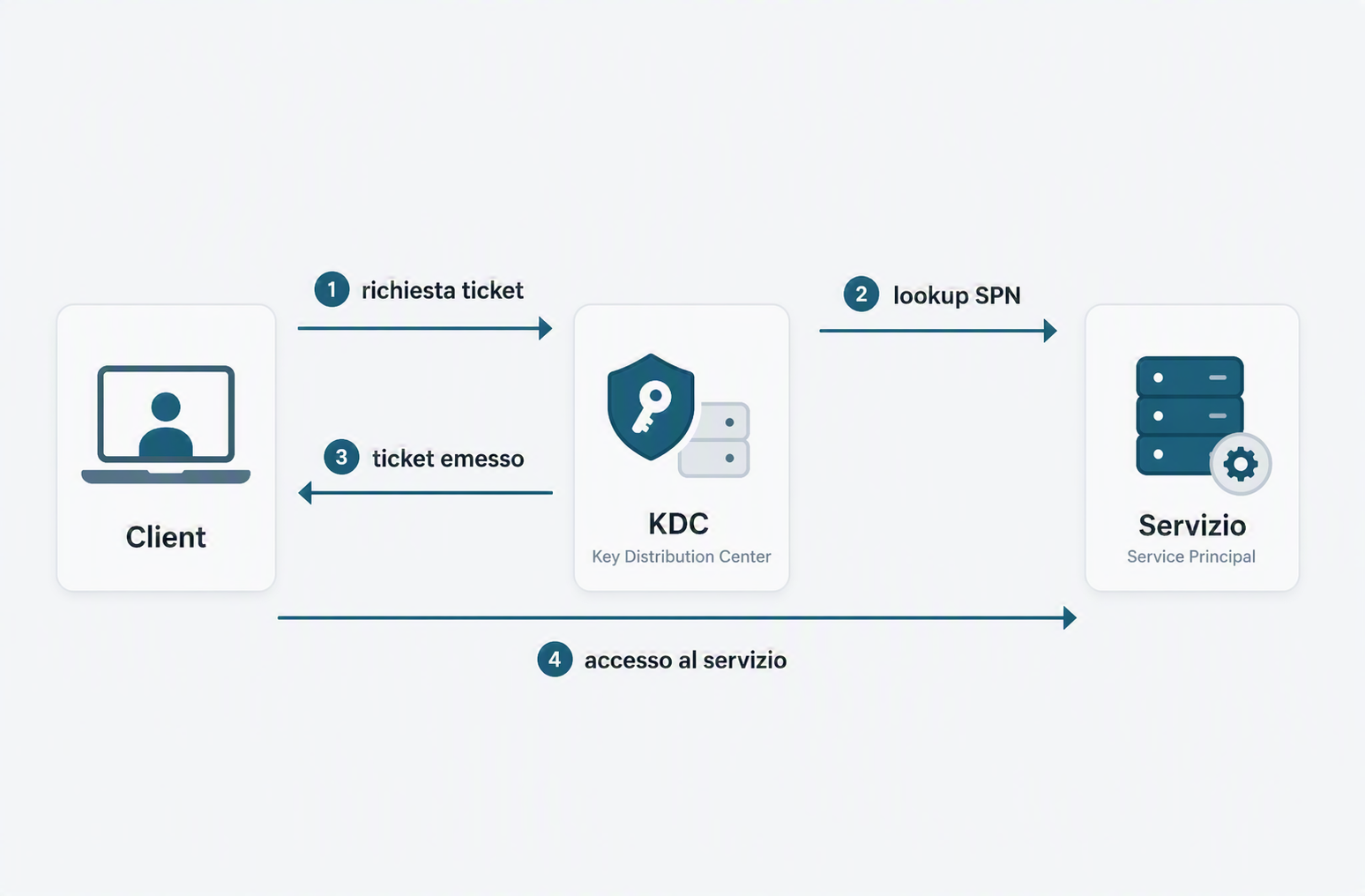
But a moment later: how does the Key Distribution Center (KDC), meaning the Kerberos component exposed by Domain Controllers, know that the token it is about to issue is for that SQL service and not another one?
Answer: the KDC does not look at IP address, it does not look at TCP port, it does not look at the HTTPS certificate. It looks at a registered service name, unique in the domain. That name is the SPN.
In short: KDC means Key Distribution Center. It is the Active Directory service that validates Kerberos requests and issues tickets (TGT/TGS) to clients.
The SPN is the key that links the physical service to its Kerberos identity in the domain. Without that key, the KDC does not know what you are asking for, and the client cannot build a valid ticket.
Immediate consequence: when the client sees Kerberos fail, it asks the service, "ok, can we use NTLM instead?" And the service, if NTLM is still enabled, answers "sure".
This is why missing SPNs silently create NTLM fallback in environments that believe they are using Kerberos.
Level 1: Conceptual - Anatomy and registration
SPN syntax
An SPN has the following format:
<ServiceType>/<Host>:<Port>@<REALM>
Let us break down each component:
| Component | Meaning | Example |
|---|---|---|
ServiceType |
Kerberos service type | HTTP, MSSQLSvc, ldap, host |
Host |
Computer name (FQDN or short name in some cases) | sqlserver.contoso.com or sqlserver |
Port |
Port (optional, but sometimes required) | 1433 for SQL Server, omitted for HTTP |
REALM |
Kerberos domain/realm (optional in many cases) | CONTOSO.COM |
Real examples:
HTTP/webapp.contoso.com- web service on webappHTTP/webapp.contoso.com:8080- web service on port 8080MSSQLSvc/sqlserver.contoso.com:1433- SQL Serverldap/dc01.contoso.com- LDAP on a Domain Controllerhost/fileserver.contoso.com- generic host servicecifs/fileserver.contoso.com- CIFS (SMB) on a file server
Who registers an SPN and where?
When you register an SPN in the domain, the SPN is linked to an Active Directory account. This account is usually:
- Computer account (for example
CONTOSO\SQLSERVER$) - when the service runs locally on that computer - User account (for example
CONTOSO\sqlservice_account) - when the service runs under a specific service account
The SPN is stored in the servicePrincipalName attribute of the account.
Fundamental rule: one SPN can be registered on one account only in the domain. If you register it on two accounts, you create a conflict that breaks Kerberos negotiation.
Who does what: automatic vs manual
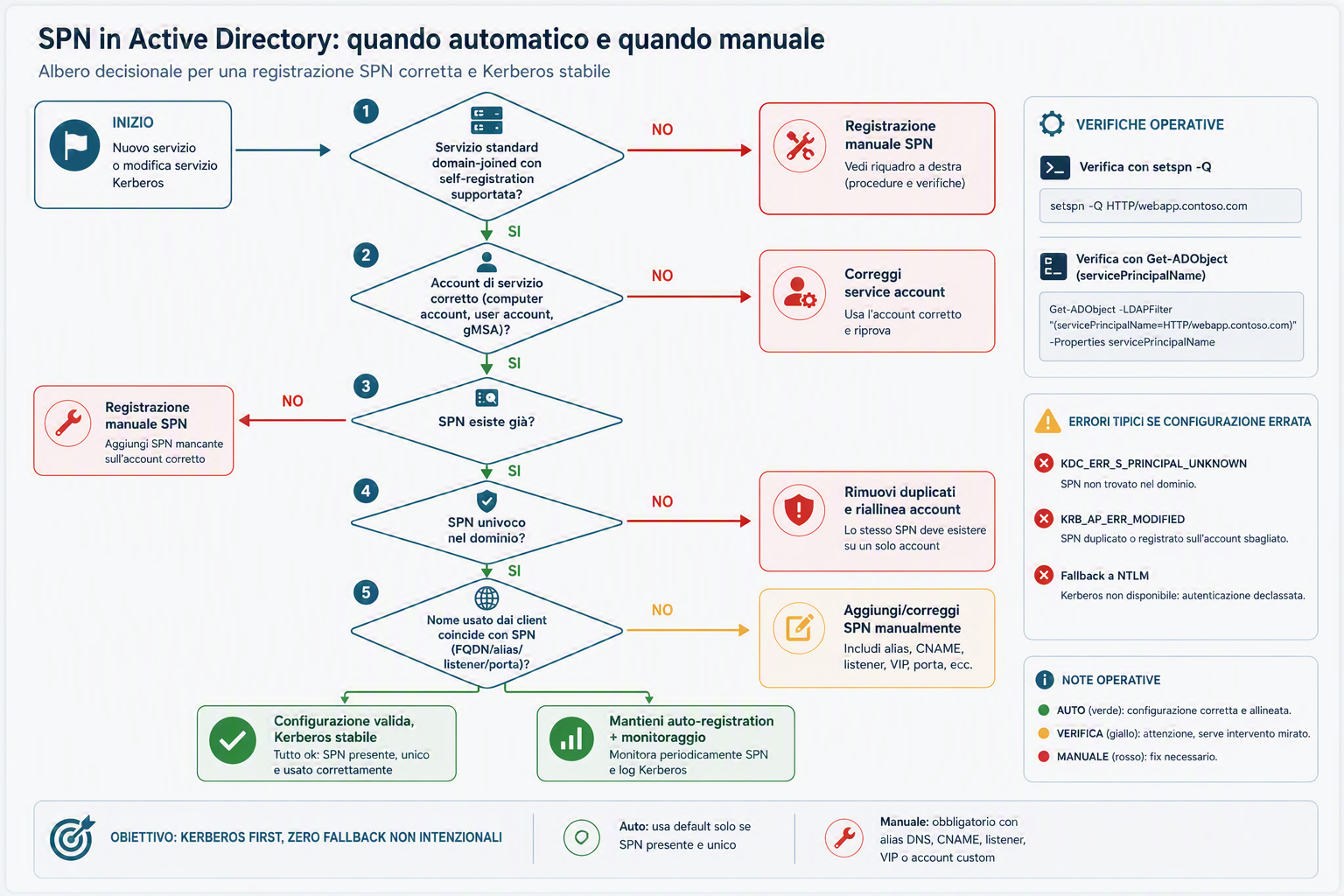
This is the most important practical question for technicians: "do I need to register it myself, or does AD handle it?"
Automatic (in most standard cases):
- system services on domain-joined computers: the computer account registers and updates many built-in SPNs (for example
HOST/,CIFS/,LDAP/on DCs) - SQL Server with the right account and permissions can automatically register
MSSQLSvc/...at startup - some Microsoft services perform self-registration at startup when running in the expected context
Manual (when you must intervene):
- the service runs under a user account/gMSA without proper write rights on
servicePrincipalName - you use DNS aliases, CNAME, listener, VIP, or application names that do not match the standard host name
- you have migrated/legacy environments with missing, duplicate, or stale SPNs
- the service does not self-register, or automatic registration fails silently
Simple operational rule:
- first try the automatic path (cleaner and more sustainable)
- then always verify the SPN actually exists and is unique
- if it is missing or wrong, perform manual registration plus immediate validation
Why to register it, and especially when
If your objective is reliable Kerberos authentication, the SPN is not a "nice to have": it is the pointer that lets the KDC issue the ticket for the correct service.
Cases where it is mandatory (or strongly recommended):
- service exposed to users or domain-joined applications that must authenticate with Kerberos
- service running under a dedicated account (user account or gMSA), not only the standard computer account
- Kerberos delegation scenarios (double-hop, backend SQL, web services with impersonation)
- application names/aliases/listeners (for example
app.contoso.com, SQL listener, VIP load balancer) different from machine name - onboarding of new services and migrations (before go-live)
When to verify or update it:
- new service creation
- service account change
- hostname/FQDN/alias/CNAME/listener/port change
- server migration, failover, replatforming, consolidation
- troubleshooting NTLM fallback or intermittent Kerberos errors
Cases where manual intervention may not be needed:
- built-in services that self-register correctly and are already unique
- workloads that do not use Kerberos by design and do not require SSO/delegation
- environments where the service is local only and does not expose integrated AD authentication
Cases where it should be avoided/omitted:
- registering SPNs by trial and error on the wrong account (ticket decryption failure risk)
- registering the same SPN on multiple accounts (duplicates)
- using SPN to mask DNS/network issues (for example access by IP): first fix naming/FQDN
- leaving legacy SPNs after rename/decommission: they become stale and create ambiguity
Practical rule: if an AD client must reach that service with Kerberos, the SPN must exist, be unique, and be on the right account; if this requirement is missing, do not add it "just in case".
Why the KDC needs SPN
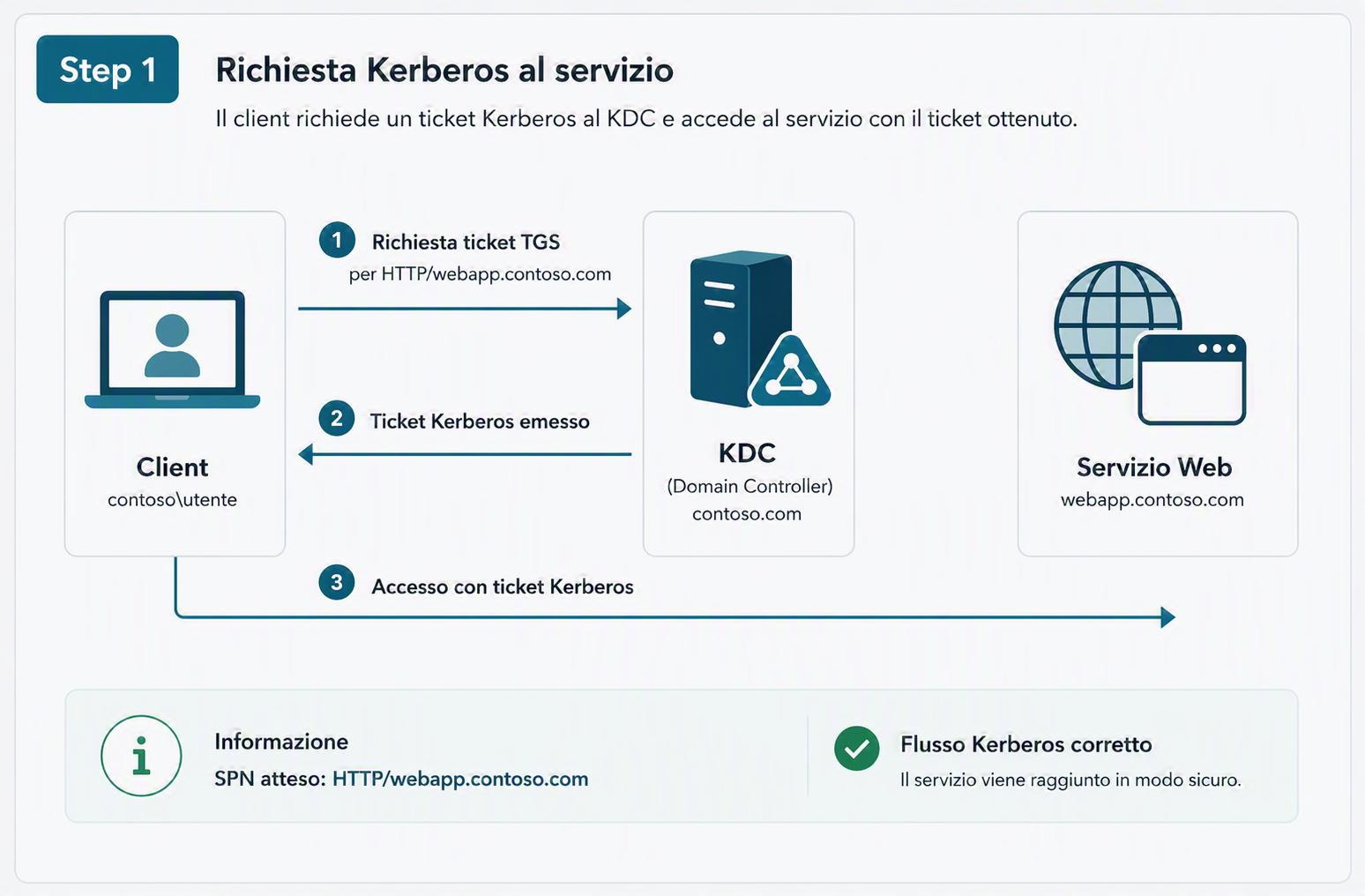
When a client starts a Kerberos request for a service, the flow is:
- Client requests the ticket: "I want a ticket for
HTTP/webapp.contoso.com" - KDC looks up the SPN: scans Active Directory for an account whose
servicePrincipalNamecontains exactlyHTTP/webapp.contoso.com - KDC issues the ticket: if it finds the account, it issues a ticket encrypted with that account password/key
- Client sends the ticket to the service: the service decrypts the ticket with its own password/key (which must match)
- Authentication succeeds: if decryption succeeds, the service knows the client is authenticated
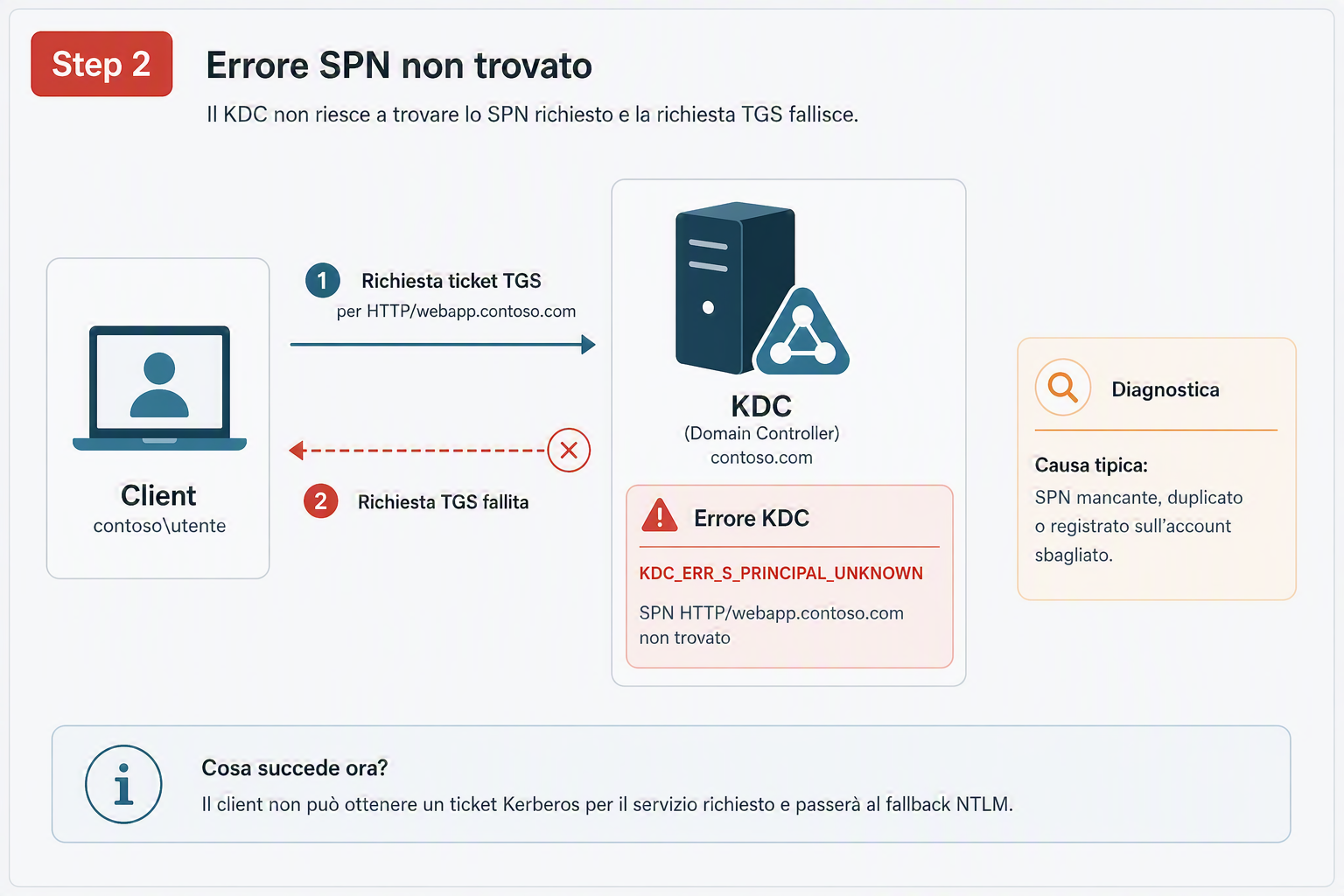
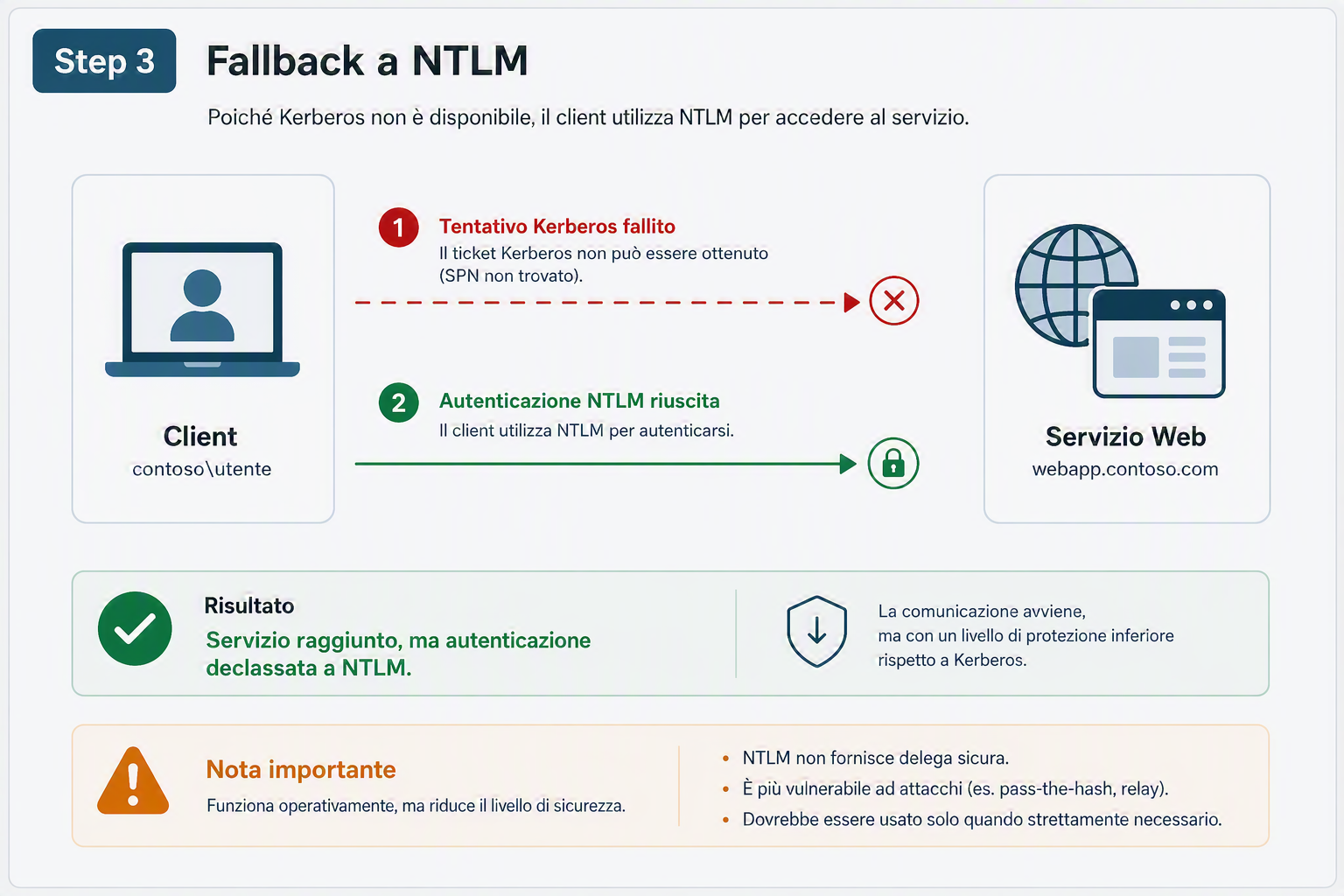
If step 2 fails (SPN not found), the KDC:
- returns an error to the client (
KRB_ERR_S_PRINCIPAL_UNKNOWNor similar) - the client, seeing the error, asks the service: "should I try NTLM?"
- the service answers: "ok"
- authentication drops to NTLM
This is the pattern you keep seeing: missing SPN -> Kerberos fails -> NTLM is used.
Level 2: Practical - How to find SPNs
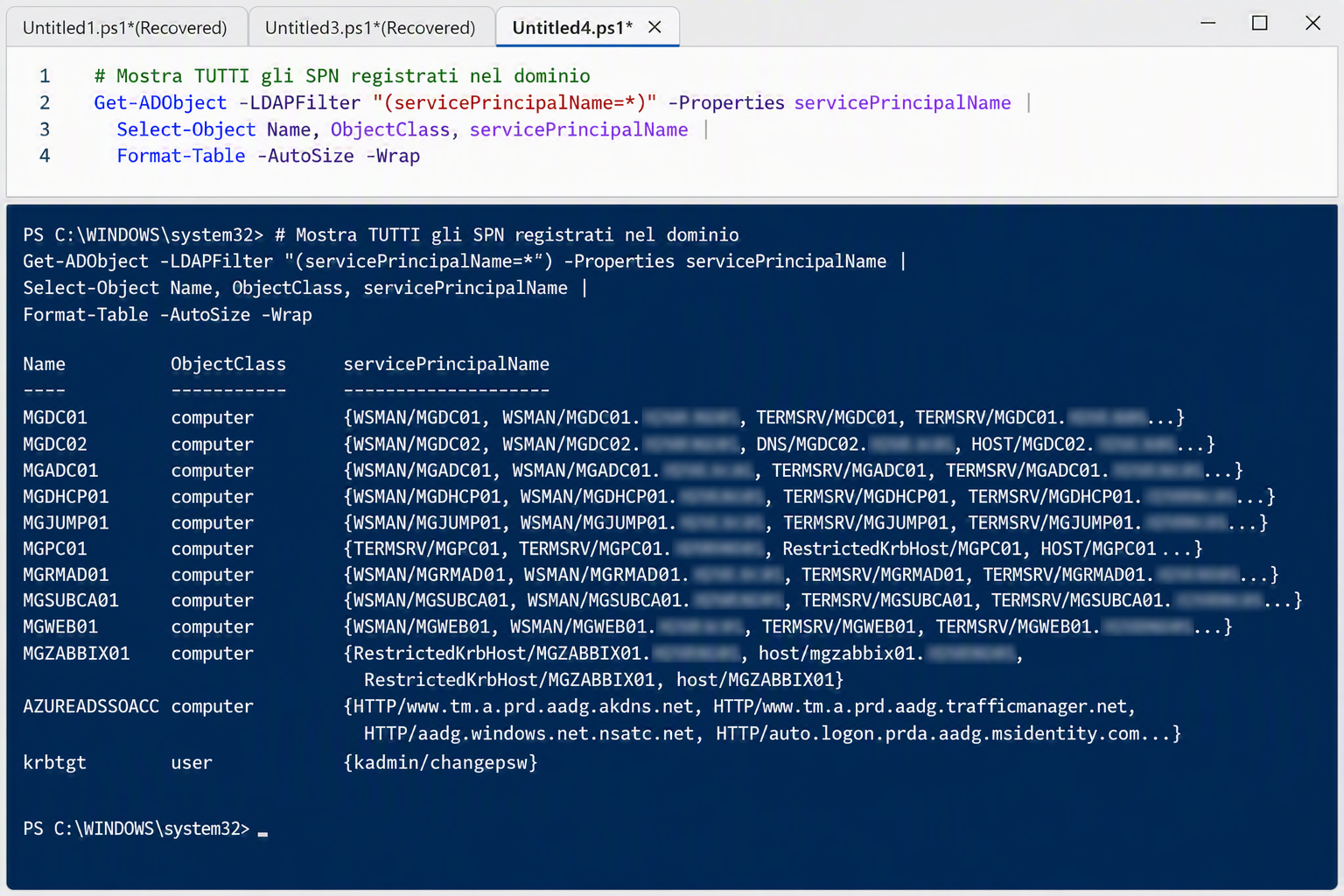
Method 1: PowerShell - Show all SPNs in a domain
# Show ALL SPNs registered in the domain
Get-ADObject -LDAPFilter "(servicePrincipalName=*)" -Properties servicePrincipalName |
  Select-Object Name, ObjectClass, servicePrincipalName |
  Format-Table -AutoSize -Wrap
This command returns every account (computer, user, service account) with a registered SPN.
Method 2: PowerShell - Search a specific SPN
# Search one specific SPN (for example, a web application)
$spn = "HTTP/webapp.contoso.com"
Get-ADObject -LDAPFilter "(servicePrincipalName=$spn)" -Properties servicePrincipalName
Useful when you know the service and want to verify whether it is already registered.
Method 3: Setspn (legacy tool, still effective)
# Show all SPNs in the domain
setspn -Q */*

# Search one specific SPN
setspn -Q HTTP/webapp.contoso.com

# Show all SPNs for one specific account
setspn -L sqlserver

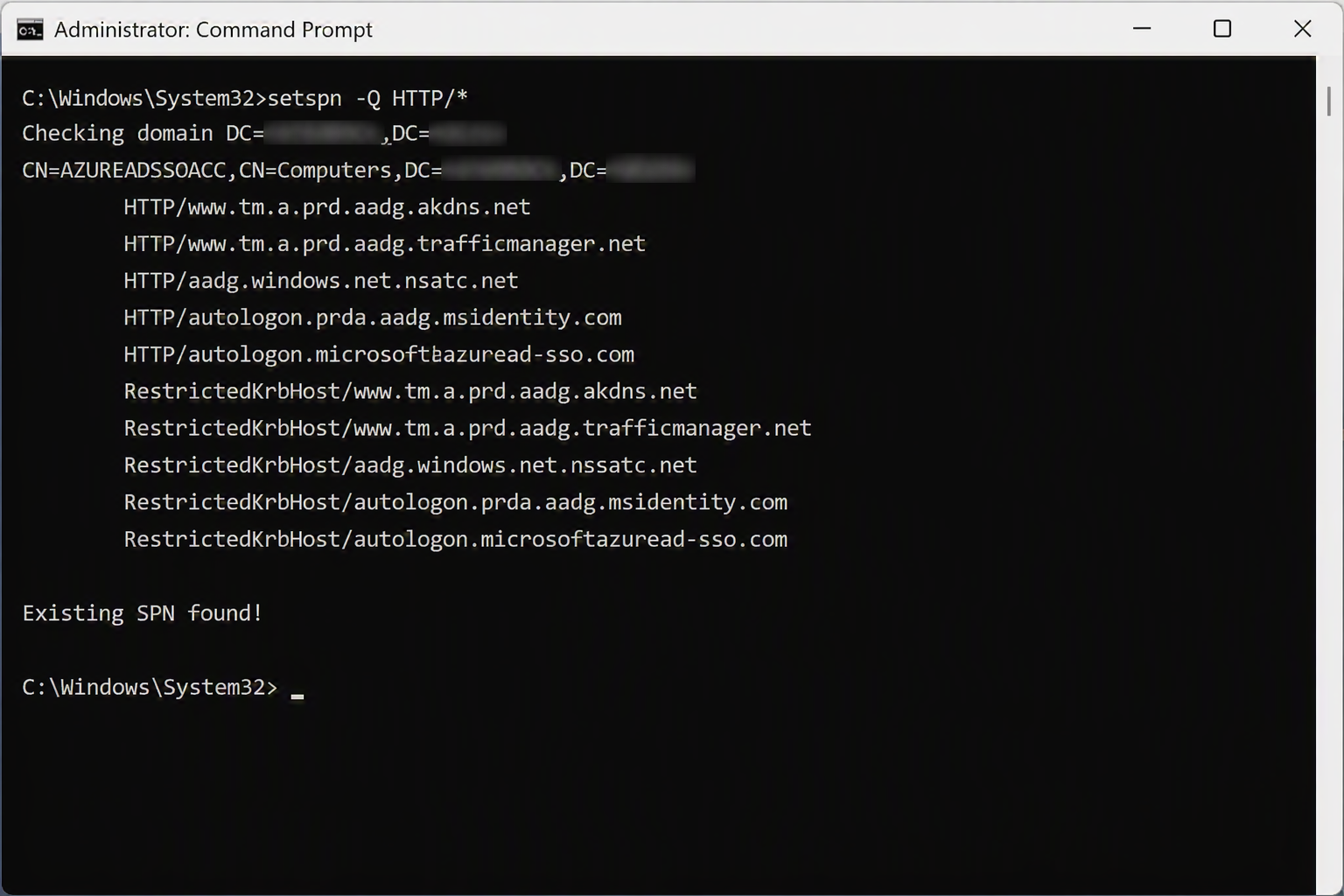
# Search SPNs for one specific service type
setspn -Q HTTP/*
setspn is the native command for SPN management and is still widely used.
Method 4: Active Directory Event IDs
Event ID 4661 (Detailed Tracking) logs access attempts to AD attributes, including servicePrincipalName. It is useful to understand who read/modified sensitive objects and to correlate SPN changes with authentication incidents.
To make it truly useful, you must enable auditing on Domain Controllers:
- Open
gpmc.mscand edit the GPO applied to Domain Controllers (typically Default Domain Controllers Policy). - Go to:
Computer Configuration > Policies > Windows Settings > Security Settings > Advanced Audit Policy Configuration > DS Access. - Enable at least:
Audit Directory Service Access(Success, optional Failure)Audit Directory Service Changes(Success)
- Run
gpupdate /forceon DCs and verify policy withauditpol /get /category:*.
Where to find events:
Event Viewer > Windows Logs > Securityon Domain Controllers.- In SIEM, filter
EventID=4661and searchservicePrincipalNamein message/XML.
Why this matters operationally:
- attribute SPN changes to a specific user/process
- build timeline when NTLM fallback suddenly increases
- identify unauthorized changes during hardening or migrations
Quick triage PowerShell script (last 24 hours on all DCs):
Import-Module ActiveDirectory

$start = (Get-Date).AddHours(-24)
$dcs = Get-ADDomainController -Filter * | Select-Object -ExpandProperty HostName

$report = foreach ($dc in $dcs) {
  Get-WinEvent -ComputerName $dc -FilterHashtable @{ LogName = 'Security'; Id = 4661; StartTime = $start } -ErrorAction SilentlyContinue |
    Where-Object { $_.Message -match 'servicePrincipalName' } |
    Select-Object @{N='DomainController';E={$dc}}, TimeCreated, Id, RecordId, MachineName, Message
}

$report |
  Sort-Object TimeCreated -Descending |
  Tee-Object -Variable spn4661 |
  Select-Object -First 30 TimeCreated, DomainController, Id, RecordId

$spn4661 | Export-Csv .\spn-event4661-last24h.csv -NoTypeInformation -Encoding UTF8
Write-Host "Event ID 4661 with servicePrincipalName found: $($spn4661.Count)"
Level 3: Diagnostic - The real problems
Problem 1: Missing SPN
Symptom: a service "works" but the client falls back to NTLM instead of using Kerberos.
Cause: no SPN registered for the service.
Real example:
You just configured SQL Server on sqlserver.contoso.com. The service account is CONTOSO\sqlservice_account. But you forgot to register MSSQLSvc/sqlserver.contoso.com:1433 on that account.
A client tries to connect with Kerberos:
- KDC searches
MSSQLSvc/sqlserver.contoso.com:1433 - does not find it
- returns an error
- client falls back to NTLM
- connection still "works" because NTLM is still enabled
How to recognize it:
Read the Kerberos log in Event Viewer on client or server. You will see something like:
Event ID 3: Kerberos authentication ticket request failed.
Status: 0xC0000225 (SPN_NOT_REGISTERED or PRINCIPAL_NOT_FOUND)
If you see this, it is almost certain the SPN is missing.
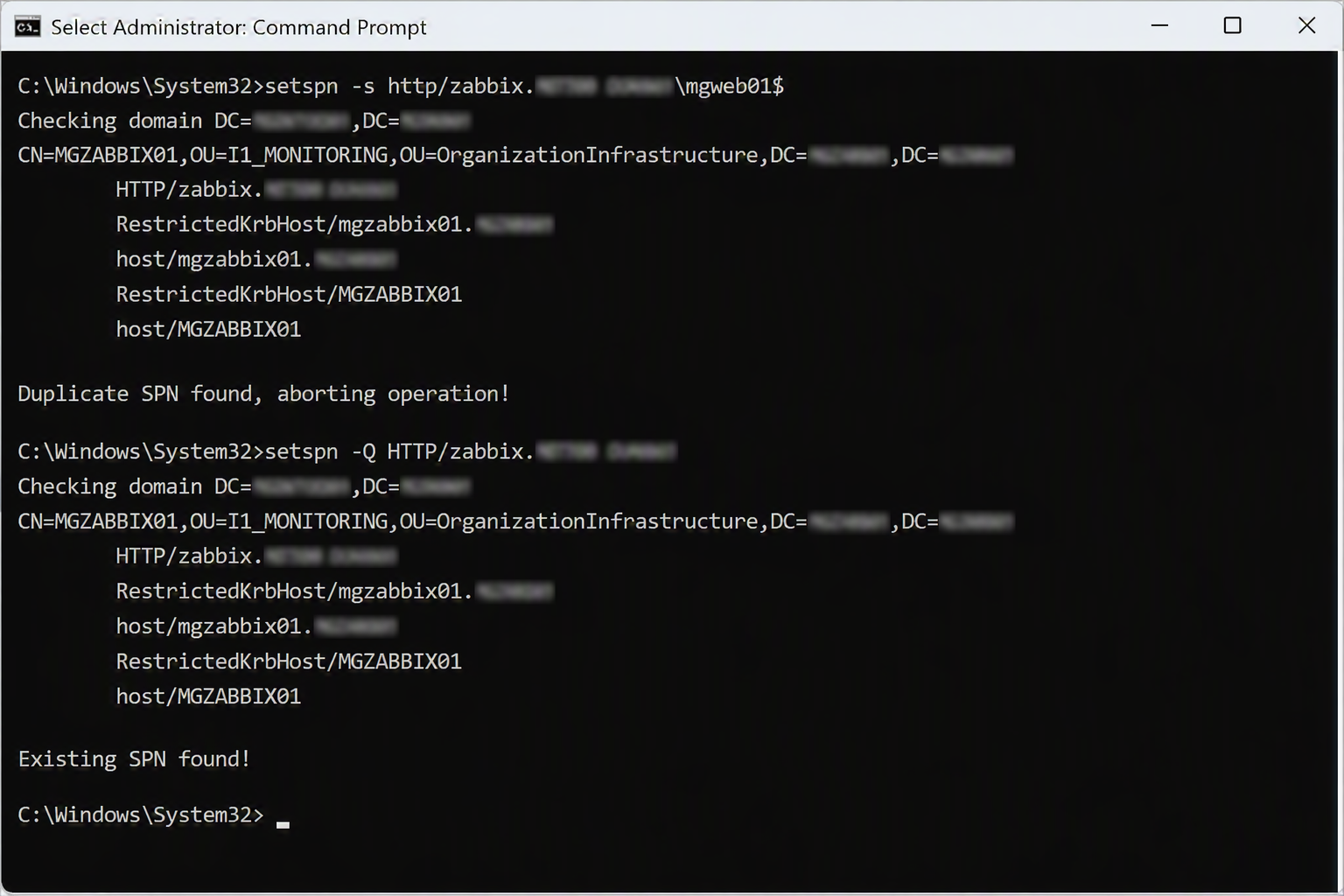
Problem 2: Duplicate SPN
Symptom: inconsistent Kerberos authentication, some tickets work, others do not. Intermittent access.
Cause: same SPN registered on multiple accounts.
Real example:
A colleague registers HTTP/webapp.contoso.com on CONTOSO\apppool1_account for the web service. Months later, during migration, they register the same SPN on CONTOSO\apppool2_account for the new pool.
Now the KDC receives requests for HTTP/webapp.contoso.com but cannot reliably decide which account to use. Sometimes it returns apppool1 ticket, sometimes apppool2, sometimes it fails.
How to recognize it:
# Search duplicate SPNs
$allSpns = Get-ADObject -LDAPFilter "(servicePrincipalName=*)" -Properties servicePrincipalName
$spnGroups = $allSpns | ForEach-Object {
  $_.servicePrincipalName | ForEach-Object { $_ }
} | Group-Object
$duplicates = $spnGroups | Where-Object { $_.Count -gt 1 }
$duplicates | ForEach-Object {
  Write-Host "Duplicate found: $($_.Name) registered $($_.Count) times"
}
Problem 3: SPN registered on the wrong account
Symptom: service runs under account X, but SPN is registered on completely different account Y.
Cause: human misconfiguration or legacy drift.
Real example:
An Exchange shared mailbox runs with CONTOSO\SharedMailbox$, but ldap/sharedmailbox.contoso.com is registered on old account CONTOSO\OldMailboxAccount$, no longer used.
When a client tries to authenticate:
- KDC finds
ldap/sharedmailboxonOldMailboxAccount$ - issues ticket encrypted with
OldMailboxAccount$secret - service (running as
SharedMailbox$) cannot decrypt ticket - authentication fails
How to recognize it:
Verify the account running the service is the same account owning the SPN:
# SQL Server example
$sqlService = Get-Service MSSQLSERVER
$serviceAccount = $sqlService.ServiceAccount  # returns account name

# Search SPN for that service
Get-ADObject -LDAPFilter "(servicePrincipalName=MSSQLSvc/*)" -Properties servicePrincipalName, Name |
  Where-Object { $_.Name -eq $serviceAccount }

# If this returns nothing, SPN is not on the right account
Problem 4: Stale or conflicting SPN
Symptom: after migration or rebrand, old authentication paths that should be gone remain active.
Cause: old SPN was not removed from domain.
Real example:
Domain used sqlserver.old.contoso.com. You rename it to sqlserver.new.contoso.com and register new SPN, but forget to remove old SPN MSSQLSvc/sqlserver.old.contoso.com:1433.
Some clients still request old name due to old habits or stale config. Suddenly those clients see conflicts or strange behavior.
How to recognize it:
List all SPNs and identify ones that do not match active services:
Get-ADObject -LDAPFilter "(servicePrincipalName=*)" -Properties servicePrincipalName, Name |
  Sort-Object Name
Manually inspect and identify SPNs that no longer map to active services.
Problem 5: Kerberos Constrained Delegation (KCD) fails only on second hop
Symptom: user authenticates correctly on frontend (IIS/app/API), but backend SQL or CIFS fails with 401, KDC_ERR_BADOPTION, or KRB_AP_ERR_MODIFIED.
Typical cause: delegation is configured, but backend SPNs in msDS-AllowedToDelegateTo do not match names actually used by application at runtime (FQDN, port, alias, listener).
Real case:
- Frontend:
HTTP/app.contoso.comon accountCONTOSO\\svc-web - Expected backend:
MSSQLSvc/sql01.contoso.com:1433 - Actual backend used by app:
MSSQLSvc/sql-listener.contoso.com:1433
First hop succeeds, second fails. The issue is not "generic Kerberos": it is mismatch between target SPN and allowed delegation.
# Verify classic KCD configuration on frontend account
Get-ADUser -Identity "svc-web" -Properties msDS-AllowedToDelegateTo, TrustedToAuthForDelegation |
  Select-Object SamAccountName, TrustedToAuthForDelegation, msDS-AllowedToDelegateTo

# Search backend SPN actually used
setspn -Q MSSQLSvc/sql-listener.contoso.com:1433
Quick KCD checklist:
- frontend SPN
HTTP/...present and unique on the right account msDS-AllowedToDelegateTocontains exactly the backend SPN used at runtime- app does not use IP or aliases different from delegation config
Problem 6: Resource-Based Constrained Delegation (RBCD) configured but ineffective
Symptom: in modern scenarios (microservices, multi-tier, identity bridge) delegation "should" work, but S4U2Proxy tickets are not issued.
Typical cause: RBCD set on backend computer account, but authorized frontend principal is wrong, or frontend valid SPN is missing.
# Verify who can delegate to backend (RBCD)
Get-ADComputer -Identity "SQL01" -Properties PrincipalsAllowedToDelegateToAccount |
  Select-Object -ExpandProperty PrincipalsAllowedToDelegateToAccount

# Verify frontend SPN requesting delegation
setspn -L WEB01
Useful operational pattern:
- In classic KCD, check mostly
msDS-AllowedToDelegateToon frontend. - In RBCD, check mostly
PrincipalsAllowedToDelegateToAccounton backend. - In both cases, without coherent frontend/backend SPNs the flow breaks.
Problem 7: Protected Users, Kerberos-only path, and blocked NTLM fallback
Symptom: application "seems to work" for standard users (who can fall back to NTLM), but fails for users in Protected Users group with access errors or 401.
Key point: a Protected Users account cannot use NTLM fallback. If Kerberos does not complete, session fails instead of degrading.
Typical question: "Do Protected Users have special SPNs registered?"
Answer: no. SPNs are not a special property of Protected Users accounts. SPNs stay registered on service/computer accounts (service targets), not on whether the user is Protected.
What changes is authentication behavior:
- standard user: in some cases can end up on NTLM and it "looks fine"
- Protected Users account: NTLM blocked, so you need correct SPNs and a clean end-to-end Kerberos path
Operational implication: Protected Users are an excellent "canary" to discover missing SPNs, inconsistent naming, unregistered aliases, or delegation misalignment.
Quick diagnostic checklist:
- confirm membership in
Protected Usersgroup - verify target service SPN (
setspn -Q ...) and uniqueness - verify client uses expected FQDN (not IP, not unregistered alias)
- correlate Kerberos events (
4768,4769,4771) with possible NTLM traces (4776)
Useful PowerShell script: find Protected Users and flag recent NTLM events (anomalies to investigate)
Import-Module ActiveDirectory

$start = (Get-Date).AddHours(-24)
$protectedUsers = Get-ADGroupMember -Identity "Protected Users" -Recursive |
  Where-Object { $_.objectClass -eq 'user' } |
  ForEach-Object { Get-ADUser $_.DistinguishedName -Properties SamAccountName } |
  Select-Object -ExpandProperty SamAccountName

$dcs = Get-ADDomainController -Filter * | Select-Object -ExpandProperty HostName

$ntlmFindings = foreach ($dc in $dcs) {
  Get-WinEvent -ComputerName $dc -FilterHashtable @{ LogName = 'Security'; Id = 4776; StartTime = $start } -ErrorAction SilentlyContinue |
    ForEach-Object {
      $msg = $_.Message
      $matchedUser = $protectedUsers | Where-Object { $msg -match [Regex]::Escape($_) } | Select-Object -First 1
      if ($matchedUser) {
        [PSCustomObject]@{
          TimeCreated = $_.TimeCreated
          DomainController = $dc
          EventId = $_.Id
          ProtectedUser = $matchedUser
          RecordId = $_.RecordId
          Message = $msg
        }
      }
    }
}

$ntlmFindings |
  Sort-Object TimeCreated -Descending |
  Tee-Object -Variable protectedNtlmEvents |
  Select-Object -First 30 TimeCreated, DomainController, ProtectedUser, EventId, RecordId

$protectedNtlmEvents | Export-Csv .\protected-users-ntlm-events-last24h.csv -NoTypeInformation -Encoding UTF8
Write-Host "NTLM events (4776) related to Protected Users in last 24h: $($protectedNtlmEvents.Count)"
If the report is not empty, you almost always have an application path still attempting NTLM or an incomplete Kerberos/SPN configuration.
Quick-win: script to identify stale SPN candidates for removal
This script does not delete anything. It produces a prioritized list of stale candidates to validate before removal.
Import-Module ActiveDirectory

$staleComputerDays = 90
$staleUserDays = 180
$now = Get-Date

$objects = Get-ADObject -LDAPFilter "(servicePrincipalName=*)" -Properties \
  servicePrincipalName,
  objectClass,
  samAccountName,
  distinguishedName,
  whenChanged,
  lastLogonTimestamp,
  userAccountControl

$report = foreach ($obj in $objects) {
  $lastLogon = if ($obj.lastLogonTimestamp) {
    [DateTime]::FromFileTime([Int64]$obj.lastLogonTimestamp)
  } else {
    $null
  }

  $daysSinceLogon = if ($lastLogon) { ($now - $lastLogon).Days } else { $null }
  $isDisabled = (($obj.userAccountControl -band 2) -ne 0)
  $threshold = if ($obj.objectClass -eq "computer") { $staleComputerDays } else { $staleUserDays }

  foreach ($spn in $obj.servicePrincipalName) {
    $looksStaleByName = $spn -match "old|legacy|decom|deprecated|backup"
    $inactiveTooLong = $daysSinceLogon -ne $null -and $daysSinceLogon -ge $threshold

    if ($isDisabled -or $inactiveTooLong -or $looksStaleByName) {
      [PSCustomObject]@{
        CandidateReason = @(
          if ($isDisabled) { "DisabledAccount" }
          if ($inactiveTooLong) { "Inactive_${daysSinceLogon}d" }
          if ($looksStaleByName) { "NamePattern" }
        ) -join ","
        ObjectClass = $obj.objectClass
        SamAccountName = $obj.samAccountName
        LastLogon = $lastLogon
        SPN = $spn
        DistinguishedName = $obj.distinguishedName
      }
    }
  }
}

$report |
  Sort-Object CandidateReason, ObjectClass, SamAccountName |
  Tee-Object -Variable staleCandidates |
  Export-Csv -Path .\spn-stale-candidates.csv -NoTypeInformation -Encoding UTF8

Write-Host "Stale candidates found: $($staleCandidates.Count)"
Safety checklist before actual removal:
- verify application ownership of service
- verify no recent related ticket usage
- remove in a change window
- keep rollback ready (
setspn -S ...) in case of regression
Level 4: Remediation - How to fix SPNs
Register an SPN correctly
On a computer account (COMPUTER$)
# Add an SPN to a computer account
$computer = Get-ADComputer "sqlserver"
Set-ADServicePrincipalName -Identity $computer -Add "MSSQLSvc/sqlserver.contoso.com:1433"

# Verify
Get-ADServicePrincipalName -Identity $computer
Or with setspn:
setspn -A MSSQLSvc/sqlserver.contoso.com:1433 sqlserver
On a service account (USER)
# Add an SPN to a user account
$account = Get-ADUser "sqlservice_account"
Set-ADServicePrincipalName -Identity $account -Add "MSSQLSvc/sqlserver.contoso.com:1433"

# Verify
Get-ADServicePrincipalName -Identity $account
Or with setspn:
setspn -A MSSQLSvc/sqlserver.contoso.com:1433 sqlservice_account
Remove an SPN
# Remove an SPN
$account = Get-ADObject "sqlserver"
Set-ADServicePrincipalName -Identity $account -Remove "MSSQLSvc/sqlserver.contoso.com:1433"
Or with setspn:
setspn -D MSSQLSvc/sqlserver.contoso.com:1433 sqlserver
Remove a duplicate SPN
If you have a duplicate SPN, first decide which account must keep it, then remove it from the wrong account:
# Find duplicates
$spn = "HTTP/webapp.contoso.com"
$accounts = Get-ADObject -LDAPFilter "(servicePrincipalName=$spn)" -Properties Name, servicePrincipalName

# Show which account should keep the SPN (usually the account running the service)
$accounts | ForEach-Object { Write-Host "Account: $($_.Name)" }

# Remove SPN from wrong account
$wrongAccount = Get-ADObject "apppool1_account"
Set-ADServicePrincipalName -Identity $wrongAccount -Remove $spn
Validate an SPN with ktpass on Linux
After registering an SPN, it is good practice to generate a keytab (for Linux systems) or validate that SPN/account/key material are coherent:
# Generate keytab for a service account (Linux or Cygwin usage)
ktpass -princ MSSQLSvc/sqlserver.contoso.com:1433@CONTOSO.COM ^
       -mapuser CONTOSO\sqlservice_account ^
       -pass MyServicePassword ^
       -ptype KRB5_NT_PRINCIPAL ^
       -out sqlserver.keytab
This command ensures account password, SPN, and keytab are synchronized.
Level 5: Integration - SPN and the issues you already read about
Link to RC4 and Kerberos enforcement
When Microsoft enabled RC4 enforcement (see previous article), one common issue was accounts without AES enabled. But how do you find affected accounts if you do not know which services have SPNs?
Answer: first build a complete SPN inventory, then verify all SPN-bearing accounts support AES.
Link to NTLM fallback
If you read the Kerberos-to-NTLM fallback article, one of the most common causes listed was missing or duplicate SPN. Now the reason is clear: without a valid SPN, KDC cannot issue a ticket and the client automatically falls back to NTLM.
If you want to eliminate NTLM from your domain, you must first ensure every Kerberos-enabled service has a valid and unique SPN registered.
Pre-hardening checklist
Before enabling Protected Users or disabling NTLM:
- Identify all services in the domain that require authentication
- Verify each service has a registered SPN
- Verify no SPN is duplicated
- Verify each SPN is registered on the account running the service
- Verify all SPN-bearing accounts support AES
- Test each service can authenticate with Kerberos (not NTLM)
- Remove stale SPNs
Event IDs and signals to monitor (SOC runbook)
When you want to verify real SPN quality, a static AD snapshot is not enough: you need to combine SPN inventory with authentication telemetry.
Priority events to monitor:
4769(TGS request): to see requested services and ticket ciphering4771(Kerberos pre-auth failed): useful for KDC-side early errors4625/4624on target servers: to correlate fallback and authentication package4776: NTLM validation, a strong indicator of unwanted fallback
Common SPN-related codes:
KDC_ERR_S_PRINCIPAL_UNKNOWN-> SPN missing/unresolvableKRB_AP_ERR_MODIFIED-> ticket issued for account different from one decrypting it (SPN on wrong or duplicate account)KDC_ERR_BADOPTION-> requested delegation not allowed (common in KCD/RBCD)
Mini triage query (adapt for SIEM):
# Last 7 days: TGS requests for HTTP/MSSQLSvc + possible related errors
$start = (Get-Date).AddDays(-7)
Get-WinEvent -FilterHashtable @{LogName='Security'; Id=4769; StartTime=$start} |
  Where-Object {
    $_.Message -match 'Service Name:\s+(HTTP|MSSQLSvc)/' -or
    $_.Message -match 'Status:\s+0x7|0xD|0x1F'
  } |
  Select-Object TimeCreated, Id, Message
30-day operational plan (SPN-first)
If you want to measurably reduce NTLM fallback without outages, this sequence is the most robust:
- Week 1 - Inventory: export all SPNs, find duplicates, map application owners.
- Week 2 - High-impact fixes: SQL, IIS, file services, high-volume
4769services. - Week 3 - Advanced cases: KCD/RBCD, DNS aliases, listeners, Linux keytabs.
- Week 4 - Validation: test with Protected Users accounts and NTLM auditing enabled.
Useful KPIs to measure improvement:
- duplicate SPN count (target:
0) - percentage of SQL sessions in
KERBEROS Event ID 4776trend on DCs (target: decreasing)- post-change authentication incidents (target: no increase)
Without this checklist, your hardening project will fail in ways that are hard to debug.
Conclusion
An SPN is the invisible bridge between a physical service and its Kerberos identity. When it is missing, duplicated, or misconfigured, Kerberos fails and the system falls back to NTLM.
If you read this after the RC4 and NTLM fallback articles, the connection should now be clear: you cannot harden Active Directory without first having full and verified control of SPNs in your domain.
Next time a security project gets stuck on unexpected authentication behavior, check SPNs. That is often where you find the real root cause.
Support this project
If this guide helped your daily work, you can support the creation of new technical content with an optional donation, which helps me purchase new hardware to maintain my LAB.
- Direct support: Support the project on PayPal
- Alternative: reach out via LinkedIn or email to share feedback and ideas for upcoming guides
Appreciation
If this guide is useful, leave a like.