Active Directory RC4 remediation: service accounts from RC4 to AES without password reset
Active Directory RC4 remediation: service accounts from RC4 to AES without password reset
Lab on pwdLastSet, User must change password at next logon, and Kerberos tickets
If you are working on RC4 remediation, Kerberos hardening, or AES-only migration in Active Directory, the operational problem is usually the same: how do you move a legacy service account from RC4 to AES without introducing outages or coordinating a high-impact password reset?
During an RC4 remediation activity in an Active Directory environment, together with colleague Riccardo Verdi we observed and tested a very interesting behavior:
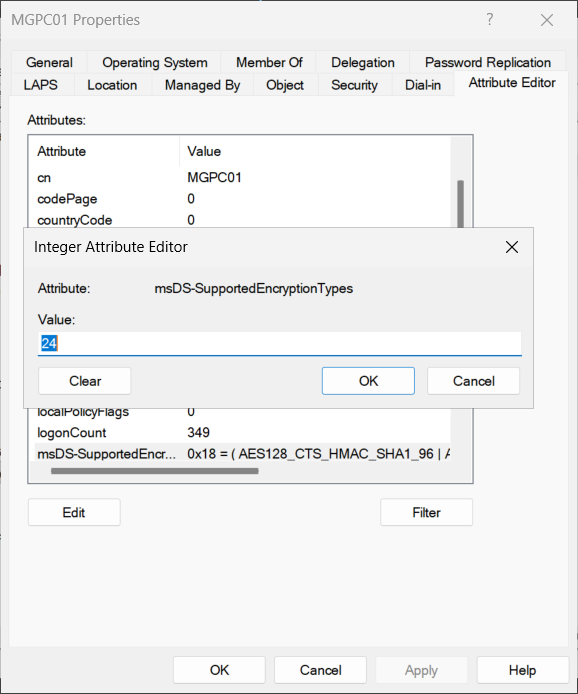
An account created under RC4-only compatible conditions, after simply toggling the User must change password at next logon option and setting
msDS-SupportedEncryptionTypes = 24, started authenticating correctly to an AES-only configured client/server, without the password actually being changed.
On deeper analysis, the Microsoft-documented part is fairly clear: the User must change password at next logon flag also acts on the pwdLastSet attribute. Microsoft documents that, to force a user to change password at next logon, pwdLastSet = 0 is set; to remove the requirement, pwdLastSet = -1 is set. The pwdLastSet attribute represents the date and time of the account's last password change and is populated by the system.
Microsoft source: User Must Change Password at Next Logon - LDAP Provider, Pwd-Last-Set attribute, MS-ADA3 pwdLastSet
The part not explicitly documented, and therefore to be treated as experimental evidence, is this:
In the lab, after toggling the flag, the account started producing AES Kerberos tickets verifiable through Event Viewer, despite no traditional password reset and without knowing or changing the account password.
This article deliberately separates the two things:
- facts documented by Microsoft;
- behavior observed in the lab;
- verification method through events 4768, 4769, 4771, and 4624.
If you want to place this guide within the broader hardening path, the most relevant references are:
- RC4 deprecation in Active Directory
- Fallback Kerberos -> NTLM in Active Directory
- SPN in Active Directory: practical guide with KCD and RBCD
Technical premise
RC4, AES, and legacy accounts
In Active Directory, Kerberos can use different encryption types for tickets and session keys. The msDS-SupportedEncryptionTypes attribute indicates the encryption types supported by a user or computer account, or by a trust relationship, according to bitmapped values defined in Microsoft specifications.
Microsoft source: MS-ADTS - msDs-supportedEncryptionTypes
Microsoft, in documentation related to CVE-2022-37966, explains that domain controllers use msDS-SupportedEncryptionTypes to determine supported encryption types on Active Directory accounts for which the value is blank or not set. The same documentation also specifies that specific computer accounts automatically set msDS-SupportedEncryptionTypes, while user accounts, gMSA, and other accounts in Active Directory do not set it automatically.
Microsoft source: KB5021131 - How to manage the Kerberos protocol changes related to CVE-2022-37966
In the RC4/AES context, the most common values to know are:
| Value | Meaning |
|---|---|
0x04 |
RC4-HMAC |
0x08 |
AES128-CTS-HMAC-SHA1-96 |
0x10 |
AES256-CTS-HMAC-SHA1-96 |
0x18 / 24 |
AES128 + AES256 |
Note:
24in decimal corresponds to0x18in hexadecimal, i.e.,0x08 + 0x10.
What Microsoft says about pwdLastSet
Here it is worth being very precise, separating "what Microsoft documents" from "what we observe in the lab."
What is officially documented
Microsoft defines pwdLastSet as the timestamp of the last password change (FILETIME format, 100 ns intervals since January 1, 1601 UTC). It also specifies that:
pwdLastSet = 0forces password change at next logon;pwdLastSet = -1removes the requirement to change password at next logon;- the value cannot be freely set to other numbers by admins, outside the expected special values.
Microsoft sources: Pwd-Last-Set attribute, User Must Change Password at Next Logon - LDAP Provider
What happens, phase by phase
From here came our intuition:
if modifying
pwdLastSetpostpones password expiration and AD interprets it as a real change, will associated encryptionTypes also be modified?
This operational reading helps prepare the cases we analyze later (already expired password, never expires, healthy account, RC4-only account):
-
Initial state
pwdLastSetcontains a valid date/time of the last password change, or 0 if the account is in "must change" state. Based on what is defined in the Default Domain Policy regarding password duration, this attribute determines whether the password is still valid or expired. -
Enabling "User must change password at next logon" AD writes
pwdLastSet = 0. Functional effect: the user must change password at the first valid interactive logon. -
Removing the "must change" check AD uses the special value
-1. Functional effect: the system recalculates the timestamp andPasswordLastSetis populated with the current date/time. -
Key point for this article This flow reliably describes
pwdLastSethandling, but it does not automatically mean "full password reset" via API or "Kerberos key regeneration always guaranteed in every scenario."
Why this distinction matters
In the rest of the article we use this exact foundation to compare edge cases:
- account with password already expired;
- account with password never expires;
- account in "healthy" state;
- legacy RC4-only account to move toward AES.
In all cases, the pwdLastSet part is well documented. What must be demonstrated each time is the real cryptographic effect (RC4 vs AES tickets) through Event ID 4768/4769 and Kerberos verification without NTLM fallback.
What Microsoft documents about key generation
In official documentation for Kerberos security events (updated versions of Event ID 4768 and 4769) Microsoft includes a very useful statement:
Available Keys: List of available keys for the account stored in Active Directory. These keys are generated during password sets and password changes.
Microsoft also adds that, with Domain Functional Level (DFL) above Windows 2008 and at least one password rotation, AES keys become available for accounts.
Microsoft sources: Event 4768, Event 4769
This is a strong documentary basis to say that password set/change and key availability are linked.
What Microsoft does not explicitly state is whether toggling ChangePasswordAtLogon alone (with transition pwdLastSet = 0 then -1) also internally triggers the key regeneration pipeline in every scenario/version.
Lab hypothesis
The hypothesis to prove is not simply that pwdLastSet gets updated. That part is already documented.
The interesting hypothesis is:
Will toggling the User must change password at next logon flag, combined with setting
msDS-SupportedEncryptionTypes = 24, make AES Kerberos keys available for an account previously usable only with RC4, without changing the password known by the application?
This behavior must be verified not "by feeling," but by observing:
- Active Directory attributes before/after;
- Kerberos events on the Domain Controller;
- tickets present on the client;
- absence of NTLM fallback.
Lab environment
Components
Below is the environment used to reproduce the behavior:
| Component | Notes |
|---|---|
| 2 Domain Controllers | Windows Server 2016 and 2025 - patched in June 2026 |
| Functional Level | Windows Server 2016 |
| Test client | Windows 11 25H2 - domain joined |
| Test account | Standard user account, non-privileged, local admin on the test client |
| Kerberos client/server policy | AES-only or otherwise without RC4 |
| Audit on DC | Kerberos Authentication Service and Kerberos Service Ticket Operations enabled |
Important: use a lab account, not a real production service account.
Required audit policies
On the Domain Controller, Kerberos-related Advanced Audit Policies must be enabled.
GPO path:
Computer Configuration
 └─ Policies
    └─ Windows Settings
       └─ Security Settings
          └─ Advanced Audit Policy Configuration
             └─ Audit Policies
                └─ Account Logon
Enable at least:
Audit Kerberos Authentication Service: Success and Failure
Audit Kerberos Service Ticket Operations: Success and Failure
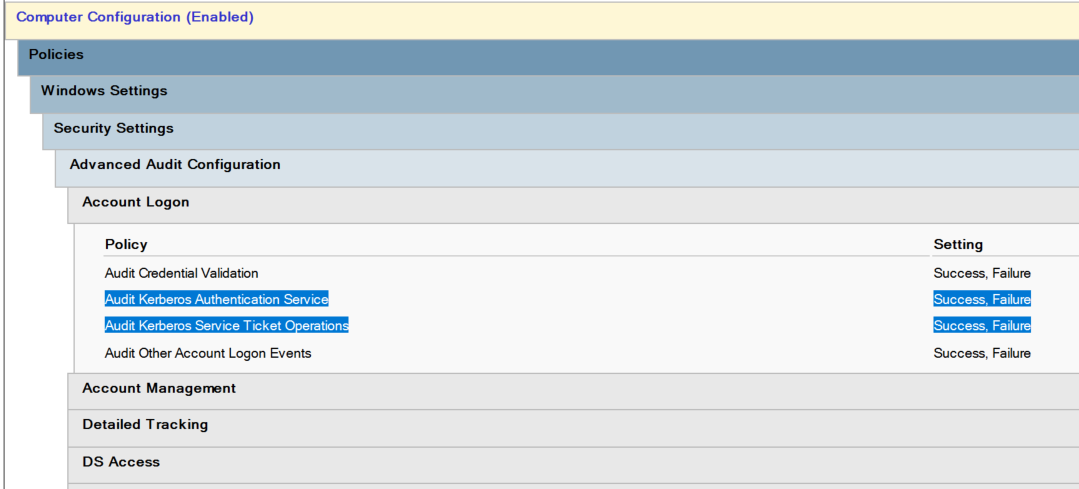
These policies allow you to observe the following events respectively:
| Policy | Main events |
|---|---|
| Audit Kerberos Authentication Service | 4768, 4771 |
| Audit Kerberos Service Ticket Operations | 4769 |
Microsoft documents Event 4768 as generated when the KDC issues a Kerberos Ticket Granting Ticket, and Event 4769 as generated when the KDC receives a TGS request for a service ticket.
Microsoft sources: Event 4768, Event 4769
Events to look for CLEARLY AND EXACTLY
This is the most important section of the article.
All events below must be searched on the Domain Controllers, in this log:
Event Viewer
 └─ Windows Logs
    └─ Security
Event 4768 - Kerberos authentication ticket, TGT
What it represents
Event 4768 indicates that a Kerberos Authentication Ticket, i.e., a TGT, was requested.
Microsoft describes the event as:
4768 (S, F): A Kerberos authentication ticket (TGT) was requested.
Microsoft source: Event 4768
Event Viewer filter
In the DC Security log, filter:
Event ID: 4768
Fields to check
In the event details, look for these fields:
| Field | What to verify |
|---|---|
Account Name / TargetUserName |
Must be the test account |
Service Name |
Usually krbtgt |
Ticket Encryption Type |
Encryption type of the TGT |
Status |
0x0 if successful |
Client Address / IpAddress |
IP of the client running the test |
Account Supported Encryption Types |
If present, encryption types supported by the account |
Account Available Keys |
If present, keys available for the account |
Client Advertized Encryption Types |
If present, etypes proposed by the client |
Values to compare
| Value | Meaning |
|---|---|
0x17 |
RC4-HMAC |
0x11 |
AES128-CTS-HMAC-SHA1-96 |
0x12 |
AES256-CTS-HMAC-SHA1-96 |
Microsoft shows in the updated Event 4768 template the TicketEncryptionType field and other fields such as AccountSupportedEncryptionTypes, AccountAvailableKeys, ServiceSupportedEncryptionTypes, ServiceAvailableKeys, DCSupportedEncryptionTypes, and DCAvailableKeys.
Microsoft source: Event 4768
Expected evidence
Before remediation:
Event ID: 4768
Account Name: account.rc4
Service Name: krbtgt
Ticket Encryption Type: 0x17
Status: 0x0
After msDS-SupportedEncryptionTypes = 24 and flag toggle:
Event ID: 4768
Account Name: account.rc4
Service Name: krbtgt
Ticket Encryption Type: 0x12
Status: 0x0
or:
Ticket Encryption Type: 0x11
Strong evidence is the switch from 0x17 to 0x11 or 0x12.
Event 4769 - Kerberos service ticket, TGS
What it represents
Event 4769 indicates that a Kerberos Service Ticket was requested.
Microsoft describes the event as:
4769 (S, F): A Kerberos service ticket was requested.
Microsoft source: Event 4769
Why it is essential
Event 4768 shows how the TGT is issued.
Event 4769 is often even more important for this scenario, because it shows the encryption type of the ticket issued for the requested service.
If you are testing access to:
\\SRVAPP01\Share
or to an HTTP, SQL, CIFS, HOST service or other SPN, Event 4769 tells you whether the service ticket is RC4 or AES.
Event Viewer filter
In the DC Security log, filter:
Event ID: 4769
Fields to check
In the event details, look for these fields:
| Field | What to verify |
|---|---|
Account Name / TargetUserName |
Account requesting the ticket |
Service Name |
Requested SPN/service, e.g. cifs/SRVAPP01, HTTP/app.contoso.local, HOST/SRVAPP01 |
Service ID |
AD account associated with the service, if present |
Ticket Encryption Type |
Encryption type of the service ticket |
Status |
0x0 if successful |
Client Address / IpAddress |
IP of the test client |
Service Supported Encryption Types |
If present, encryption types supported by the service |
Service Available Keys |
If present, keys available for the service |
DCSupportedEncryptionTypes |
If present, etypes supported by the DC |
DCAvailableKeys |
If present, keys available on the DC |
Client Advertized Encryption Types |
If present, etypes proposed by the client |
Microsoft documents Event 4769 as the event generated when the KDC receives a TGS request, and shows in the updated payload fields such as TicketEncryptionType, ServiceSupportedEncryptionTypes, ServiceAvailableKeys, DCSupportedEncryptionTypes, DCAvailableKeys, and ClientAdvertizedEncryptionTypes.
Microsoft source: Event 4769
Expected evidence
Before the change:
Event ID: 4769
Account Name: account.rc4
Service Name: cifs/SRVAPP01
Ticket Encryption Type: 0x17
Status: 0x0
After msDS-SupportedEncryptionTypes = 24 + flag toggle:
Event ID: 4769
Account Name: account.rc4
Service Name: cifs/SRVAPP01
Ticket Encryption Type: 0x12
Status: 0x0
or:
Ticket Encryption Type: 0x11
This is one of the strongest proofs in the article.
Event 4771 - Kerberos pre-authentication failed
What it represents
Event 4771 is generated when Kerberos pre-authentication fails.
In this lab it mainly serves to document behavior before remediation, if the account cannot authenticate in the AES-only context.
Event Viewer filter
In the DC Security log, filter:
Event ID: 4771
Fields to check
| Field | What to verify |
|---|---|
Account Name |
Test account |
Client Address |
Client from which the test starts |
Failure Code |
Kerberos error code |
Pre-Authentication Type |
Pre-auth type |
Ticket Options |
Ticket options |
Interesting codes
In an encryption type incompatibility scenario, the most interesting code to look for is:
0xE - KDC has no support for encryption type
This code is useful if the test fails because client, DC, and account cannot negotiate a common encryption type.
Note: not every test will produce 4771. It depends on the exact point where authentication fails and on the type of Kerberos request generated.
Event 4624 - Successful logon
What it represents
Event 4624 indicates a successful logon.
In this lab, it is not enough to prove that logon succeeds: you must prove that logon succeeds using Kerberos and not NTLM.
Where to search
Event 4624 can be searched:
- on the target server/host accessed by the account;
- in some cases also on the client, depending on the logon/access scenario.
Log:
Event Viewer
 └─ Windows Logs
    └─ Security
Filter:
Event ID: 4624
Fields to check
| Field | Expected value |
|---|---|
Account Name |
Test account |
Logon Type |
Depends on the scenario, often 3 for network access |
Authentication Package |
Kerberos |
Logon Process |
Typically consistent with Kerberos/Negotiate |
Workstation Name / Source Network Address |
Test client |
Expected evidence
Event ID: 4624
Account Name: account.rc4
Logon Type: 3
Authentication Package: Kerberos
This closes a possible objection:
Access works because it is falling back to NTLM.
If 4624 shows Authentication Package: Kerberos and 4769 shows Ticket Encryption Type: 0x12, the proof is much stronger.
Demonstration procedure
Phase 1 - Create RC4-only account
Create a lab account:
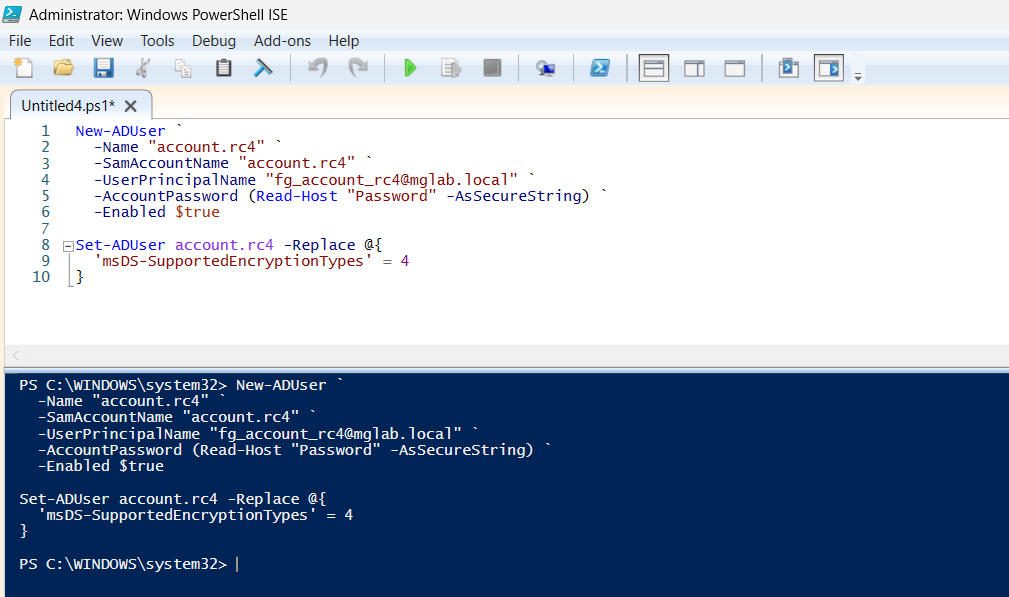
New-ADUser `
  -Name "account.rc4" `
  -SamAccountName "account.rc4" `
  -UserPrincipalName "account.rc4@contoso.local" `
  -AccountPassword (Read-Host "Password" -AsSecureString) `
  -Enabled $true
Set or keep the account in an initial RC4-only compatible condition.
Explicit example:
Set-ADUser account.rc4 -Replace @{
  'msDS-SupportedEncryptionTypes' = 4
}
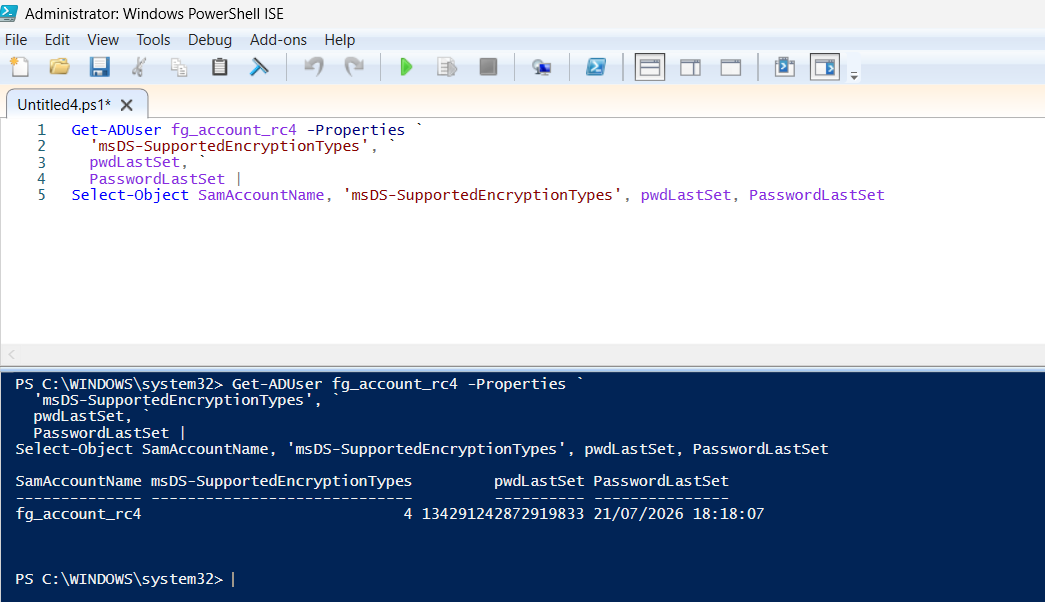
Verify attributes:
Get-ADUser fg_account_rc4 -Properties `
  'msDS-SupportedEncryptionTypes', `
  pwdLastSet, `
  PasswordLastSet |
Select-Object SamAccountName, 'msDS-SupportedEncryptionTypes', pwdLastSet, PasswordLastSet
Expected:
msDS-SupportedEncryptionTypes = 4
or a value consistent with RC4 use in your lab.
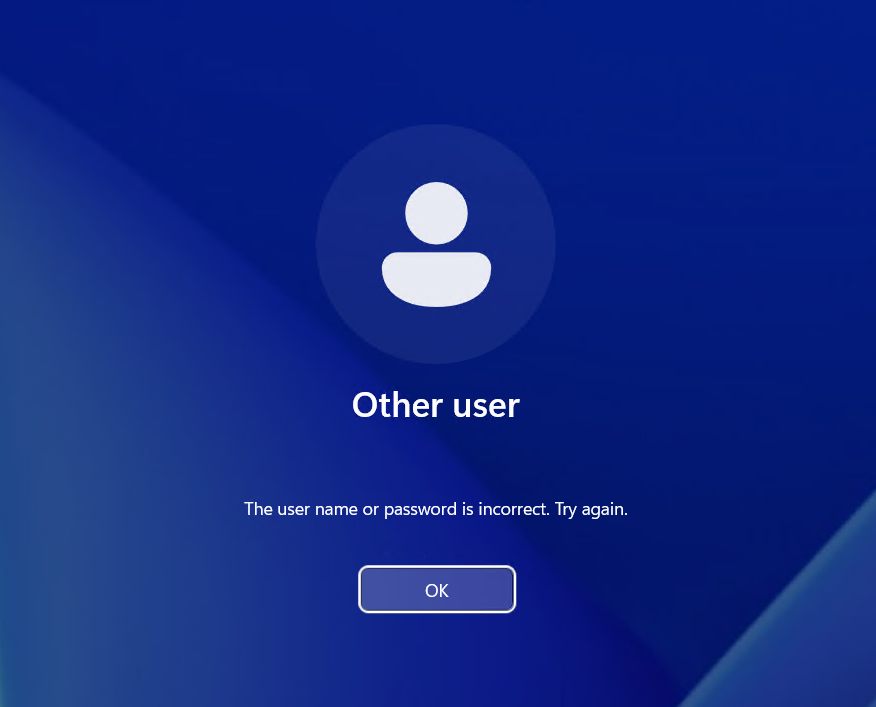
When performing a logon test on an AES-only client, we get a wrong password error.
Phase 2 - Toggle setting: enable flag
Enable:
User must change password at next logon
From PowerShell:
Set-ADUser fg_account_rc4 -ChangePasswordAtLogon $true
Verify:
Get-ADUser fg_account_rc4 -Properties pwdLastSet, PasswordLastSet |
Select-Object SamAccountName, pwdLastSet, PasswordLastSet
Expected:
pwdLastSet = 0
PasswordLastSet = <empty/not populated or equivalent>
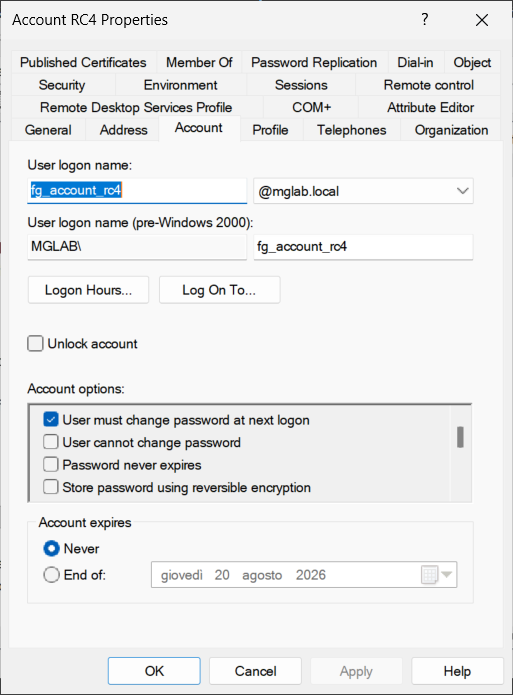
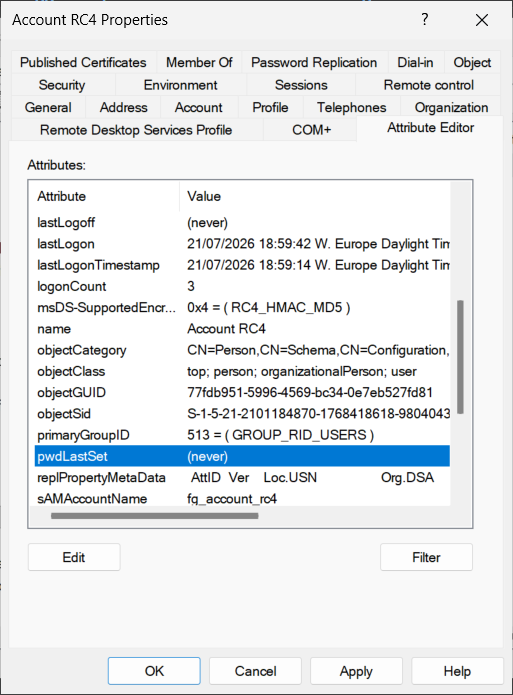
This is the behavior documented by Microsoft: pwdLastSet = 0 forces password change at next logon.
Microsoft source: User Must Change Password at Next Logon - LDAP Provider
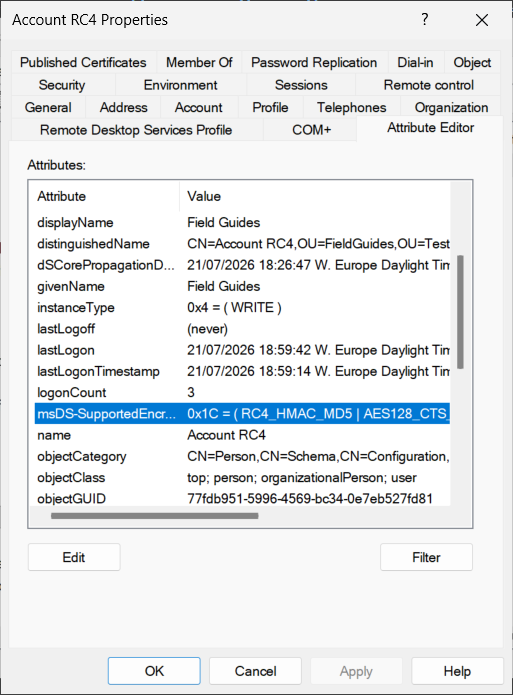
Phase 3 - Set msDS-SupportedEncryptionTypes = 24
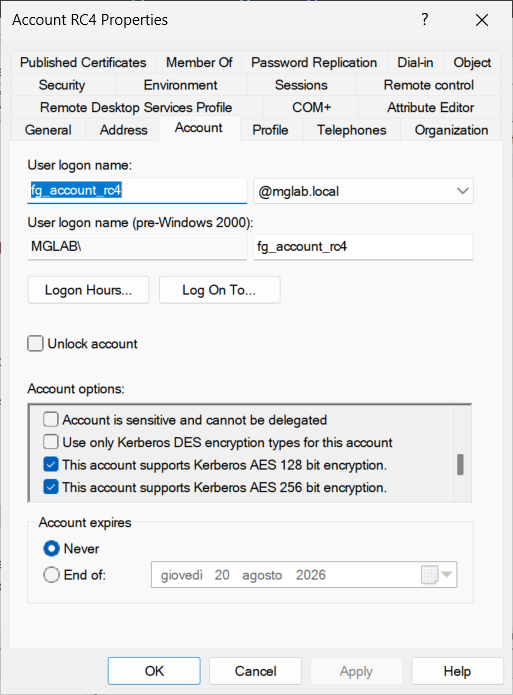
Set AES128 + AES256:
Set-ADUser fg_account_rc4 -Replace @{
  msDS-SupportedEncryptionTypes = 24
}
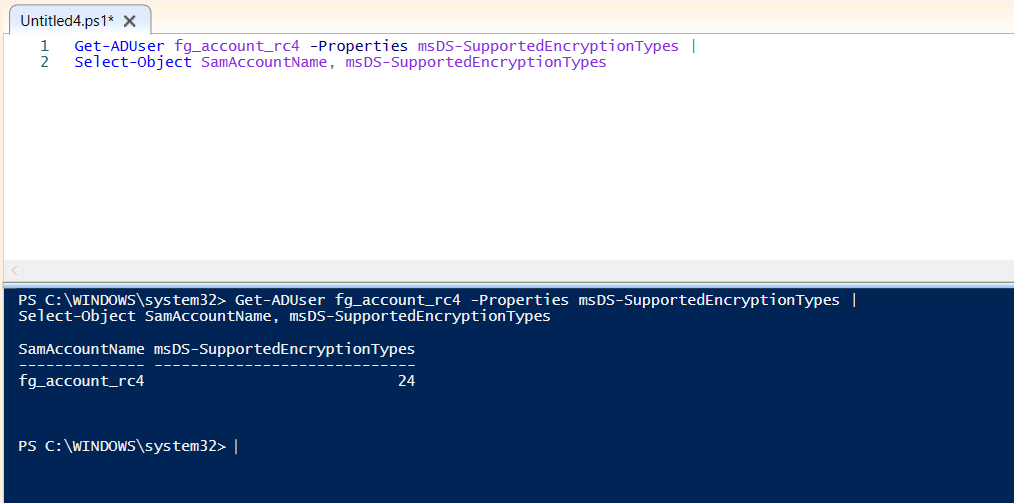
Verify:
Get-ADUser fg_account_rc4 -Properties msDS-SupportedEncryptionTypes |
Select-Object SamAccountName, msDS-SupportedEncryptionTypes
Expected:
msDS-SupportedEncryptionTypes = 24
Where:
24 decimal = 0x18 hexadecimal = AES128 + AES256
Microsoft source on bitmapped values: MS-ADTS - msDs-supportedEncryptionTypes
Phase 4 - Remove toggle
Uncheck:
User must change password at next logon
From PowerShell:
Set-ADUser fg_account_rc4 -ChangePasswordAtLogon $false
Verify:
Get-ADUser fg_account_rc4 -Properties `
  msDS-SupportedEncryptionTypes, `
  pwdLastSet, `
  PasswordLastSet |
Select-Object SamAccountName, msDS-SupportedEncryptionTypes, pwdLastSet, PasswordLastSet
Expected:
msDS-SupportedEncryptionTypes = 24
PasswordLastSet = <current date/time>
Microsoft documents that to remove the requirement to change password at next logon, pwdLastSet = -1 is set, and the attribute is managed by the system.
Microsoft source: User Must Change Password at Next Logon - LDAP Provider
Phase 5 - Test Kerberos authentication
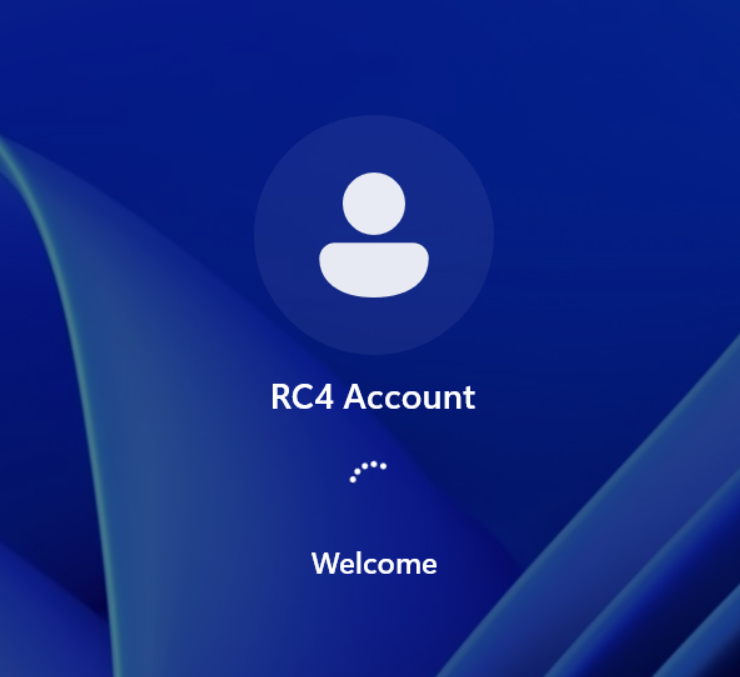
Perform a logon on the AES-only client. The password will now be accepted and the user will complete login.
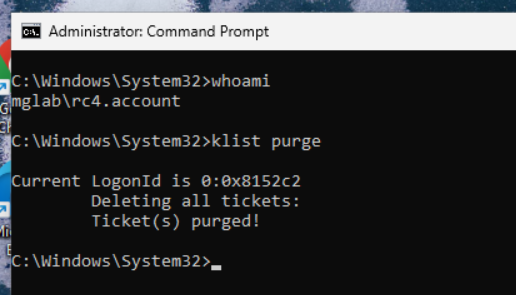
Before further testing, clear tickets on the client side:
klist purge
Then generate a real Kerberos request, for example by accessing a share:
dir \\SRVAPP01\Share
or a controlled service/SPN:
whoami /all
Then verify tickets on the client side:
klist
Look in the ticket for the encryption type field.
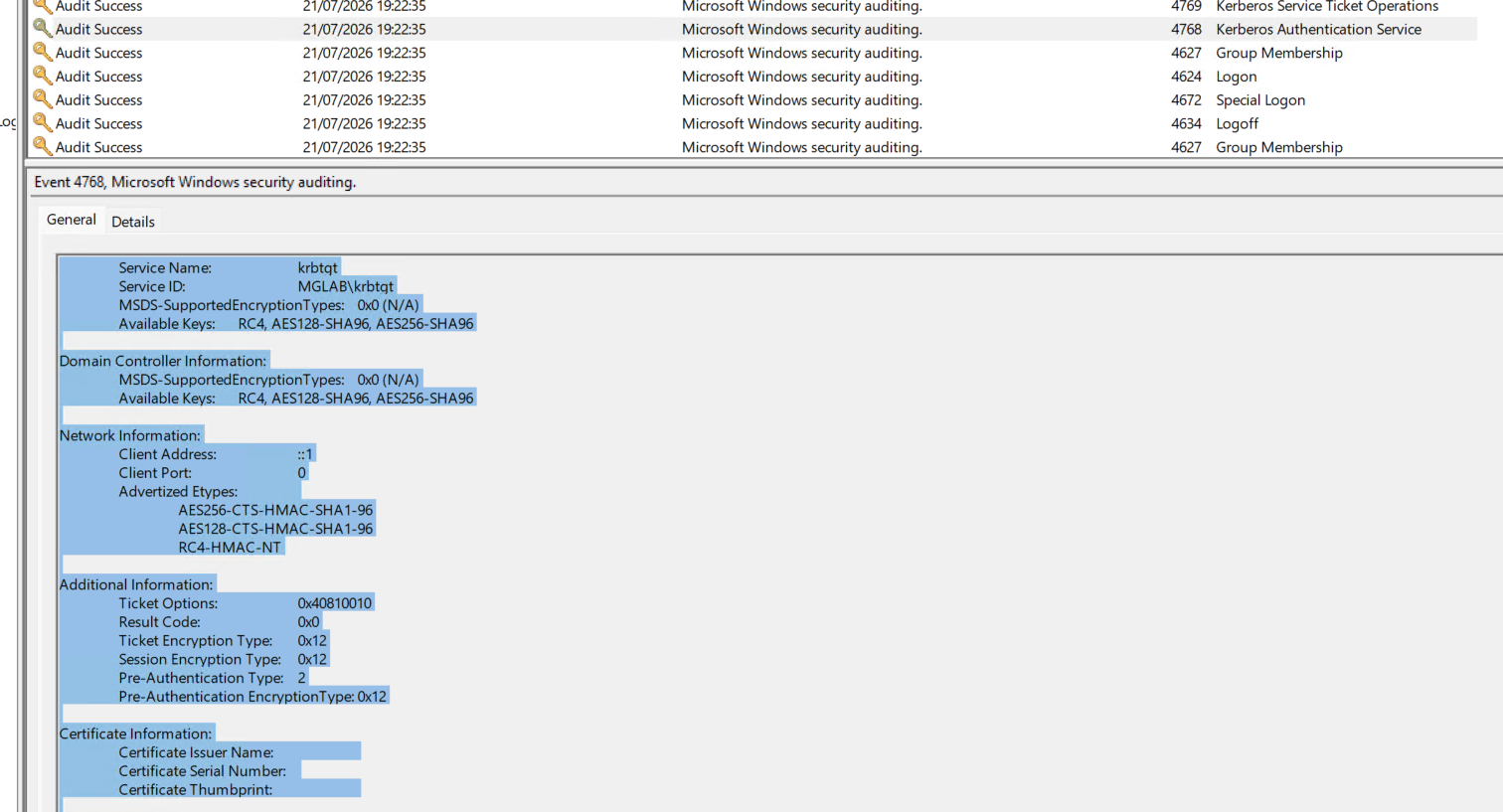
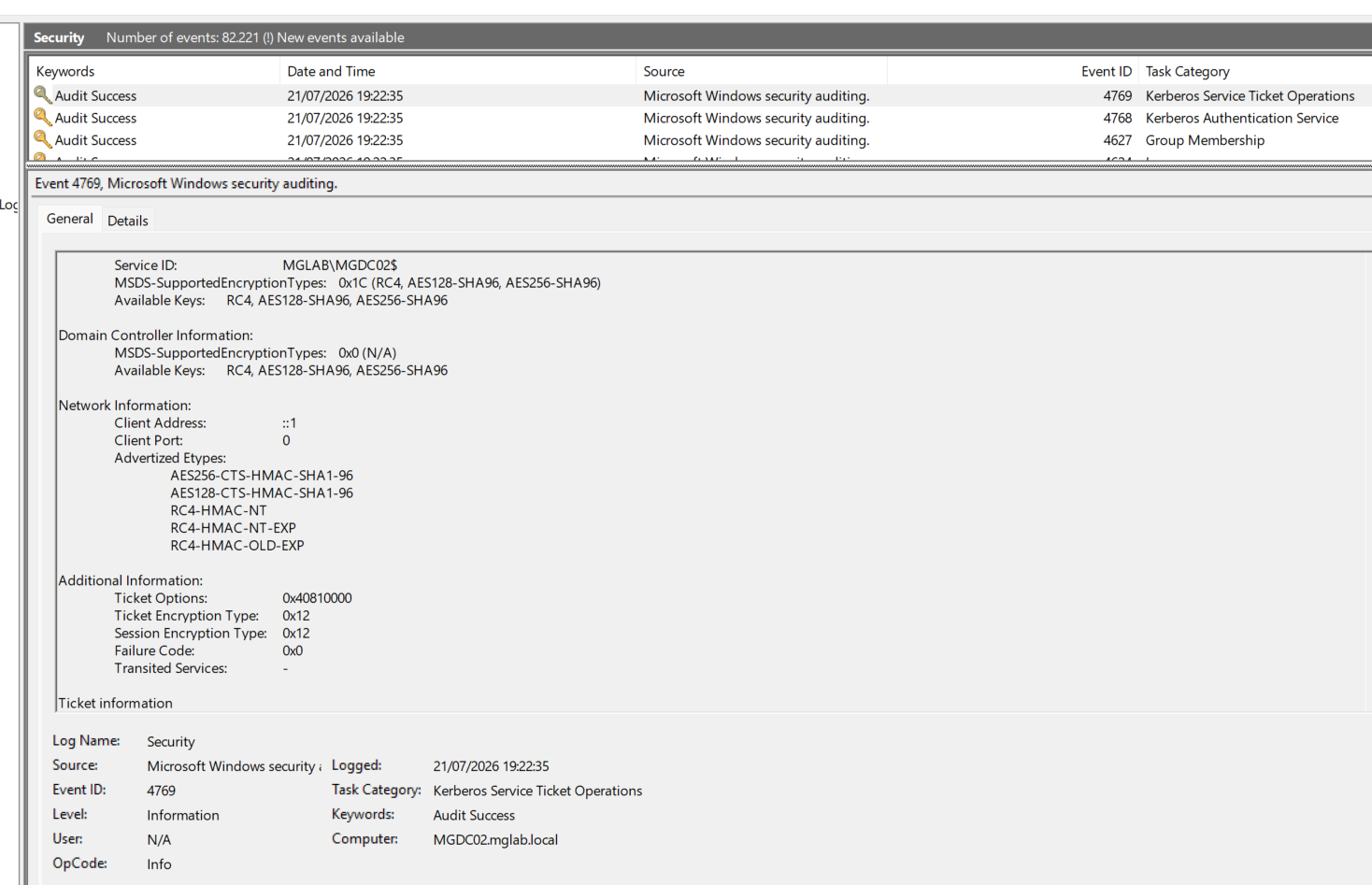
DC-side evidence
On the Domain Controller, search immediately after the test:
Event ID: 4768
Account Name: fg_account_rc4
Ticket Encryption Type: 0x11 or 0x12
Status: 0x0
And especially:
Event ID: 4769
Account Name: fg_account_rc4
Service Name: <tested SPN>
Ticket Encryption Type: 0x11 or 0x12
Status: 0x0
Server/target-side evidence
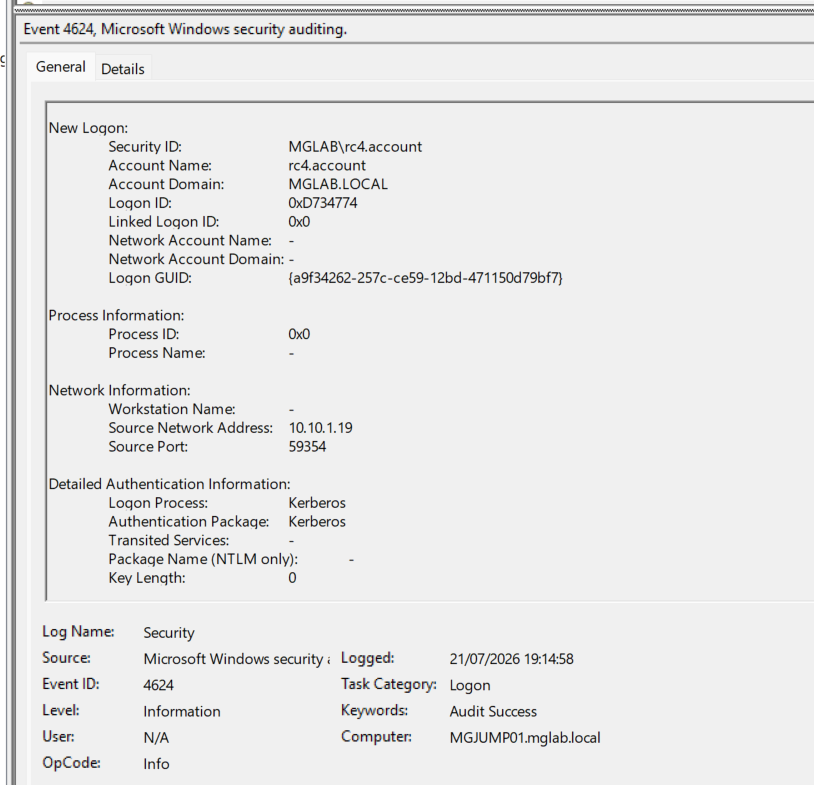
On the target server, look for:
Event ID: 4624
Account Name: fg_account_rc4
Authentication Package: Kerberos
If instead this appears:
Authentication Package: NTLM
the proof is not valid to demonstrate Kerberos AES, because NTLM fallback occurred and the cause must be investigated.
Evidence 1 - Initial account state
PowerShell output:
Get-ADUser fg_account_rc4 -Properties msDS-SupportedEncryptionTypes,pwdLastSet,PasswordLastSet |
Select-Object SamAccountName,msDS-SupportedEncryptionTypes,pwdLastSet,PasswordLastSet
Useful PowerShell queries to extract events
Search 4768 events for account
$Account = "fg_account_rc4"

Get-WinEvent -FilterHashtable @{
  LogName = 'Security'
  Id      = 4768
} | Where-Object {
  $_.Properties.Value -contains $Account
} | Select-Object TimeCreated, Id, Message
Search 4769 events for account
$Account = "fg_account_rc4"

Get-WinEvent -FilterHashtable @{
  LogName = 'Security'
  Id      = 4769
} | Where-Object {
  $_.Properties.Value -contains $Account
} | Select-Object TimeCreated, Id, Message
Quickly extract RC4/AES tickets from messages
$Account = "fg_account_rc4"

Get-WinEvent -FilterHashtable @{
  LogName = 'Security'
  Id      = 4769
} | Where-Object {
  $_.Message -match $Account
} | Select-Object TimeCreated, Id, @{
  Name = 'TicketEncryptionType'
  Expression = {
    if ($_.Message -match 'Ticket Encryption Type:\s+(0x[0-9A-Fa-f]+)') {
      $Matches[1]
    }
  }
}, Message
Search Kerberos 4624 logons on target server
$Account = "fg_account_rc4"

Get-WinEvent -FilterHashtable @{
  LogName = 'Security'
  Id      = 4624
} | Where-Object {
  $_.Message -match $Account -and
  $_.Message -match 'Authentication Package:\s+Kerberos'
} | Select-Object TimeCreated, Id, Message
Test outcome and what it actually proves
Microsoft documents that
pwdLastSetis used to force/remove password change at next logon (0and-1) and that Kerberos Available Keys are generated during password set and password change. Microsoft does not explicitly document that togglingUser must change password at next logonalone always causes AES/RC4 key regeneration. In this article we therefore treat that effect as lab evidence, verified with events 4768/4769 (switch from0x17to0x11/0x12) and with 4624 Kerberos check without NTLM fallback.
Operational considerations
If confirmed across multiple environments and Domain Controller versions, this technique can be useful in RC4 remediation because it:
- does not require knowing the service account password;
- does not change the password used by the application;
- updates
PasswordLastSet; - allows effect verification through Kerberos events;
- can drastically reduce operational impact compared to a classic password reset.
However, before applying it in production, it is necessary to:
- validate it in a lab;
- test it on non-critical accounts;
- confirm events 4768 and 4769;
- confirm authentication occurs via Kerberos and not NTLM;
- verify AD replication between Domain Controllers;
- document every change made;
- plan operational rollback.
If in your environment you do not find an explicit Microsoft statement on the toggle as a key regeneration mechanism, treat this step as "validated in the lab" and not as a universal product guarantee. Always repeat the test in your domain before large-scale remediation.
Limitations and threats to validity
1) AD replication and timing across DCs
If the test uses different DCs in close time windows, you can read attributes and tickets on out-of-sync replicas.
Practical mitigation:
- perform attribute changes and event verification on the same DC when possible;
- verify replication convergence before the final test;
- always note which DC issued the 4768/4769 used as evidence.
2) Ticket cache on client/server side
Already-issued tickets can contaminate results and make behavior look unchanged when it has actually changed.
Practical mitigation:
klist purgeon client side before each test;- new real authentication toward target SPN after purge;
- tight time correlation between action, 4768/4769, and possible 4624.
3) Non-homogeneous initial account state
An account that has already had recent password rotation may already have AES keys available, even if it still uses RC4 in some flows.
Practical mitigation:
- capture baseline with
msDS-SupportedEncryptionTypes,pwdLastSet,PasswordLastSet; - verify in new event fields the presence of
Account Available KeysandService Available Keyswhen available; - keep "before" and "after" evidence for the same account and same SPN.
4) Build and hardening policy differences
DC patch level, Kerberos policies, and legacy configurations can change etype negotiation outcomes.
Practical mitigation:
- report DC OS version and patch level used in the lab;
- report client/server Kerberos policies (AES-only, RC4 disabled, etc.);
- repeat the test on at least two DC/client version combinations.
5) Ambiguity between "key available" and "key used"
A key being available does not automatically mean it will be selected in the final ticket; selection depends on negotiation between client, KDC, and account/service.
Practical mitigation:
- use
Ticket Encryption Typeon 4769 (service ticket) as primary proof; - use 4768 as TGT-side support;
- use 4624 to prove Kerberos and not NTLM fallback.
6) Scope of the conclusion
The correct conclusion is not "the toggle always regenerates keys in every environment" but:
Within the described lab scope, the toggle associated with
msDS-SupportedEncryptionTypes = 24and followed by event verification produced observable AES tickets.
Final verification checklist
| Step | Check | Evidence |
|---|---|---|
| 1 | Account created/forced RC4-only | msDS-SupportedEncryptionTypes = 4 or equivalent state |
| 2 | Initial RC4 ticket | Event 4768/4769 with Ticket Encryption Type = 0x17 |
| 3 | Toggle enabled | pwdLastSet = 0 |
| 4 | AES set | msDS-SupportedEncryptionTypes = 24 |
| 5 | Toggle removed | PasswordLastSet updated |
| 6 | Final AES ticket | Event 4768/4769 with Ticket Encryption Type = 0x11 or 0x12 |
| 7 | Kerberos logon | Event 4624 with Authentication Package = Kerberos |
| 8 | No NTLM fallback | Absence of 4624 with Authentication Package = NTLM for the same test |
Official Microsoft sources
- User Must Change Password at Next Logon - LDAP Provider
- Pwd-Last-Set attribute - Active Directory Schema
- MS-ADA3 - Attribute pwdLastSet
- MS-ADTS - msDs-supportedEncryptionTypes
- KB5021131 - How to manage the Kerberos protocol changes related to CVE-2022-37966
- Event 4768 - A Kerberos authentication ticket (TGT) was requested
- Event 4769 - A Kerberos service ticket was requested
- ms-DS-KeyVersionNumber attribute - Active Directory Schema
Conclusion
The behavior documented by Microsoft is as follows:
- the User must change password at next logon flag modifies
pwdLastSet; pwdLastSet = 0forces password change at next logon;pwdLastSet = -1removes the requirement and updates the value through the system;msDS-SupportedEncryptionTypescontrols encryption types supported by the account.
The behavior observed in the lab is more interesting:
after enabling the flag, setting
msDS-SupportedEncryptionTypes = 24, and removing the flag, an account previously tied to RC4 started authenticating correctly with AES, with evidence through Kerberos events 4768/4769.
Proof must not be based on the impression that "login works," but on objective evidence:
4768 / 4769 before  = 0x17 RC4-HMAC
4768 / 4769 after   = 0x11 AES128 or 0x12 AES256
4624 final          = Authentication Package: Kerberos
If confirmed across multiple environments, this behavior can become a very useful building block in RC4 remediation activities, especially for legacy service accounts where a traditional password reset can be complex, risky, or hard to coordinate.
Appreciation
If this guide is useful, leave a like.