SYSVOL permissions audit in Active Directory: who can really modify your GPOs?
Context
During security assessments and GPO governance reviews, it is common to find environments with mature tooling: change management, auditing, approval workflows, versioning, and formalized processes.
The critical point is almost never the tool itself.
The risk appears when delegation is implemented poorly, when an operational group grows without control, or when an urgent fix broadens permissions beyond necessity and remains permanent.
In these situations, one question becomes decisive:
What happens if an unauthorized user can modify the content distributed through SYSVOL?
The answer is simple: you can have a GPO that looks secure in the console, while its operational payload is alterable on the file system.
If your goal is to understand not only who can alter a GPO's content, but also how to separate who should receive the policy from who is allowed to administer it, a useful companion read is GPO Security Filtering vs Delegation in Active Directory: critical differences for audits and hardening.
Scope and evidence
This article focuses on a precise scope: operational GPO security on the SYSVOL side (GPT), not only delegation visibility in GPMC.
Evidence in this guide is practical and verifiable:
- real assessment scenario patterns;
- controlled lab demonstration with no offensive payload;
- PowerShell-based audit and remediation checklist;
- production-ready least-privilege principles.
Objective of this article
This article does not claim that GPO governance products automatically introduce vulnerabilities.
On the contrary, in most cases the issue is implementation:
- excessive delegation;
- NTFS or Share ACLs that are too permissive;
- unmanaged inheritance;
- security groups reused over the years;
- service accounts without least-privilege boundaries.
The goal is to show how to identify and fix this risk in a practical way.
5-minute quick audit
If time is limited, validate these 5 points first:
- SHARE ACLs on SYSVOL and NETLOGON: no
Change/Fullfor broad groups. - NTFS ACLs on
Policies\{GUID}: noModify/Writefor unauthorized identities. - Effective remote SMB access: validate NTFS+SHARE intersection.
- GPT inheritance chain: no unintended historical inheritance.
- Delegated group membership: no oversized legacy groups.
If one of these checks fails, treat the GPO as exposed until remediation is complete.
Products that often require additional delegation or access
In enterprise contexts, it is common to find solutions that require dedicated accounts, approval workflows, or access to GPO/SYSVOL content.
| Product | Vendor | Purpose |
|---|---|---|
| Advanced Group Policy Management (AGPM) | Microsoft | Versioning, approvals, and GPO change management |
| GPOADmin | Quest | GPO governance and change control |
| Recovery Manager for Active Directory | Quest | GPO and SYSVOL backup and restore |
| PolicyPak | Netwrix | Advanced extensions to Microsoft policies |
| ADManager Plus | ManageEngine | Administrative management of GPOs |
| ADAudit Plus | ManageEngine | Policy change auditing |
| Cayosoft Administrator | Cayosoft | Active Directory governance and administration |
| Cayosoft Guardian | Cayosoft | Change auditing and monitoring |
| Change Manager for Group Policy | SDM Software | Approval workflows and change control |
| Group Policy Automation Engine | SDM Software | GPO automation and deployment |
| Group Policy Auditing and Attestation | SDM Software | Auditing and compliance |
| Group Policy Compliance Manager | SDM Software | Compliance controls |
Their presence does not imply weakness, but it should trigger a focused review of:
- NTFS ACLs;
- Share ACLs;
- delegated groups;
- service accounts;
- inherited permissions on GPT paths.
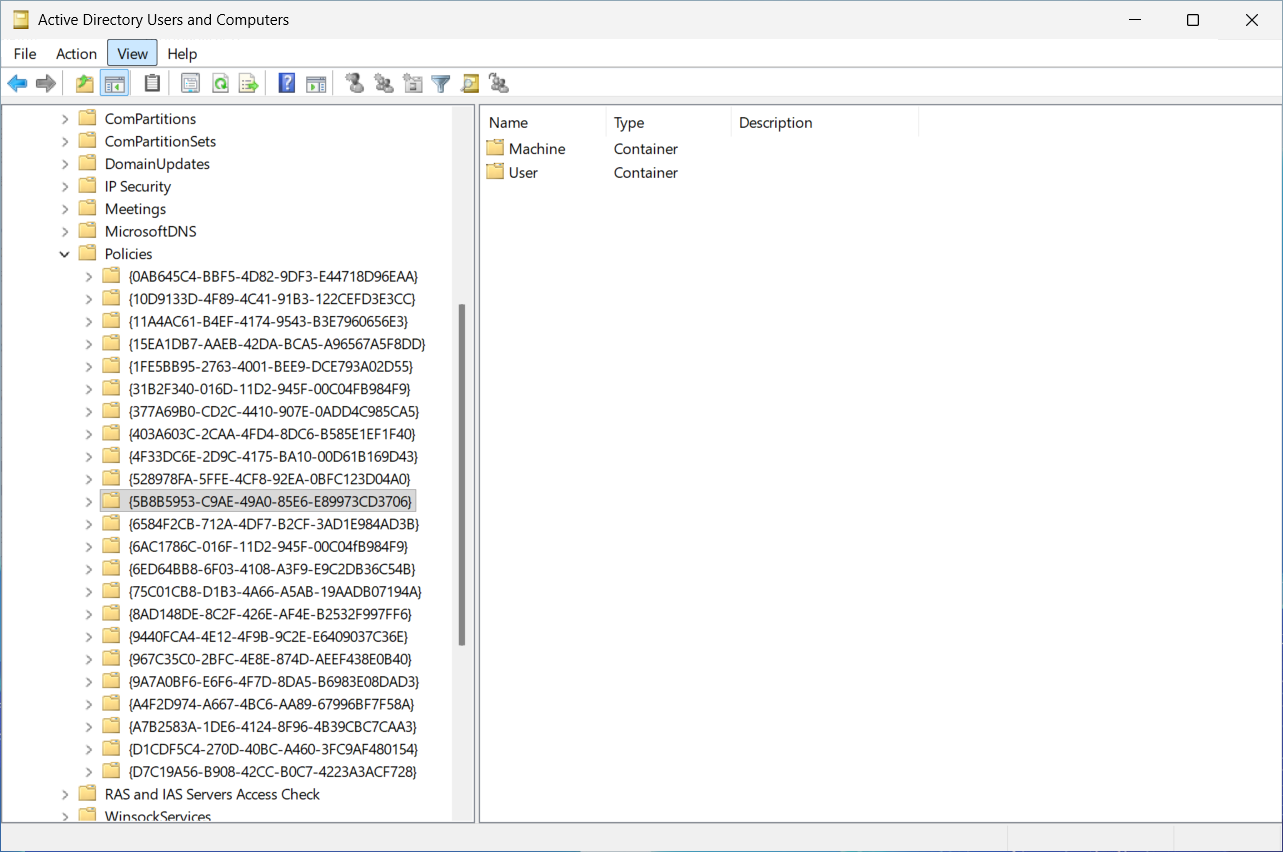
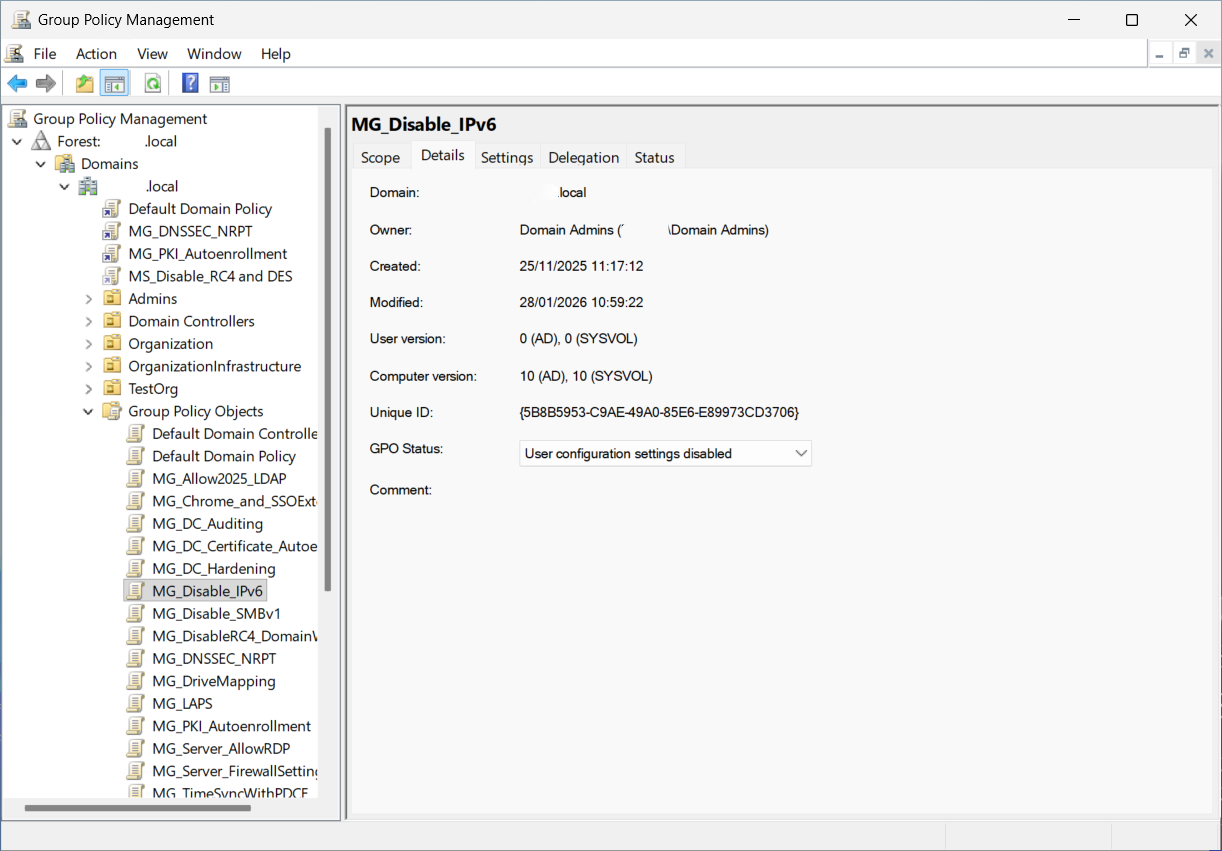
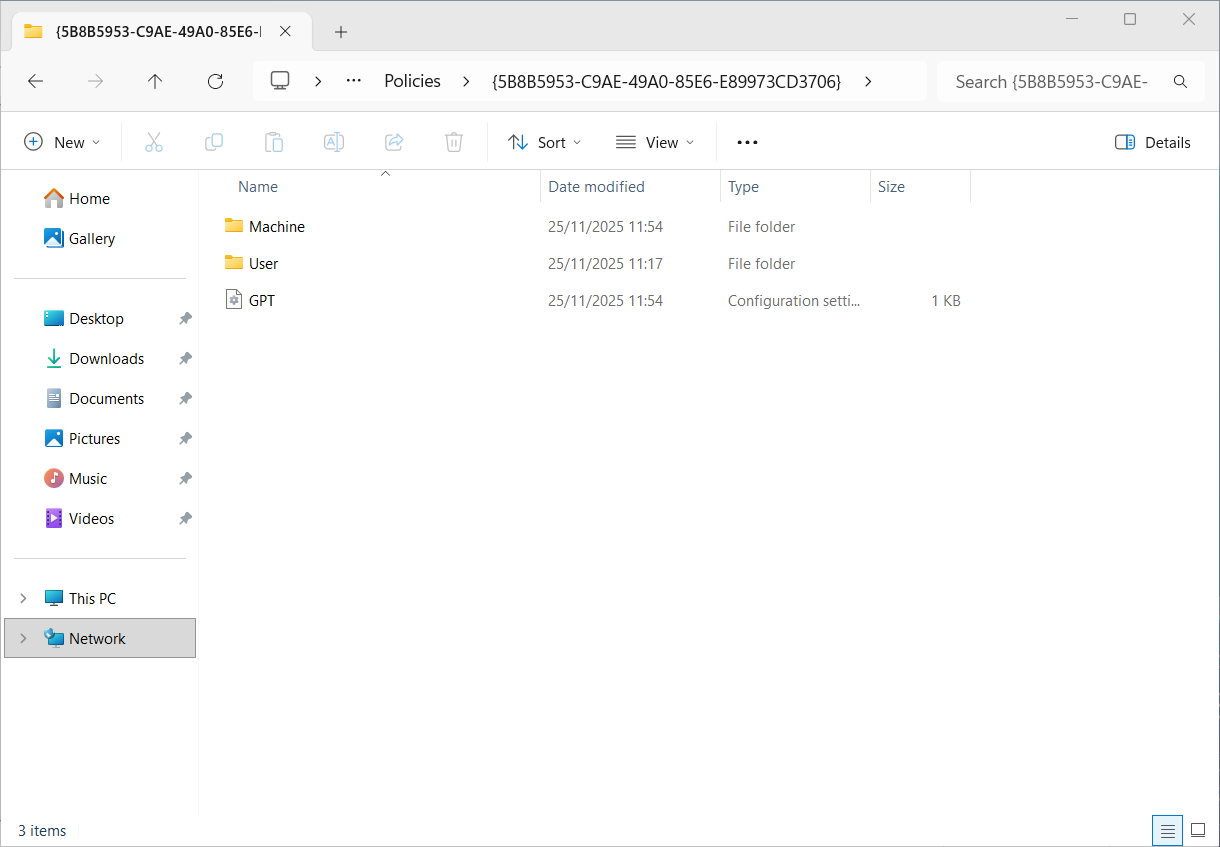
Where a Group Policy really lives
A GPO is made of two distinct elements.
Group Policy Container (GPC)
The Active Directory part:
CN={GUID}
CN=Policies
CN=System
DC=domain
DC=local
It stores metadata, versions, and linking information.
Group Policy Template (GPT)
The SYSVOL part:
\\domain.local\SYSVOL\domain.local\Policies\{GUID}
It stores the files that clients actually consume:
- scripts;
- Registry.pol;
- preferences;
- computer/user settings;
- distributed content.
The GPT is the operational impact point.
The control that almost everyone skips
Many audits correctly focus on:
- delegation in GPMC;
- GPO ownership;
- GPO creation and linking rights;
- GPO-side edit permissions.
Much less frequently, NTFS and Share ACLs on SYSVOL GPT paths are analyzed with the same depth.
Yet that is where clients read what they must apply.
If the GPT is writable by unauthorized identities, the policy is compromised even when GPMC appears clean.
Why wrong NTFS ACLs can allow writes (and when they do not)
This is a key point: on SMB paths, effective permissions are the intersection of NTFS ACLs and SHARE ACLs.
In practice:
- if NTFS grants
Modifybut the SHARE grants onlyRead, remote write via\\domain\SYSVOLshould not pass; - if both NTFS and SHARE grant write, GPT content can be altered;
- if access happens locally on the Domain Controller (local path), SHARE permissions are out of scope.
So when an assessment finds effective write access on GPT, you must always validate both layers: NTFS and SHARE.
What SHARE defaults you should expect on SYSVOL/NETLOGON
Details can vary slightly by baseline and hardening profile, but in a healthy setup the principle is:
- authenticated users with read-only access;
- administrators with full control;
- no
ChangeorFullassigned to broad groups (Everyone,Authenticated Users,Domain Users).
Recommended quick check:
Get-SmbShareAccess -Name SYSVOL
Get-SmbShareAccess -Name NETLOGON
Or:
net share
Lab demonstration (without commercial tools)
You do not need third-party software to isolate the issue.
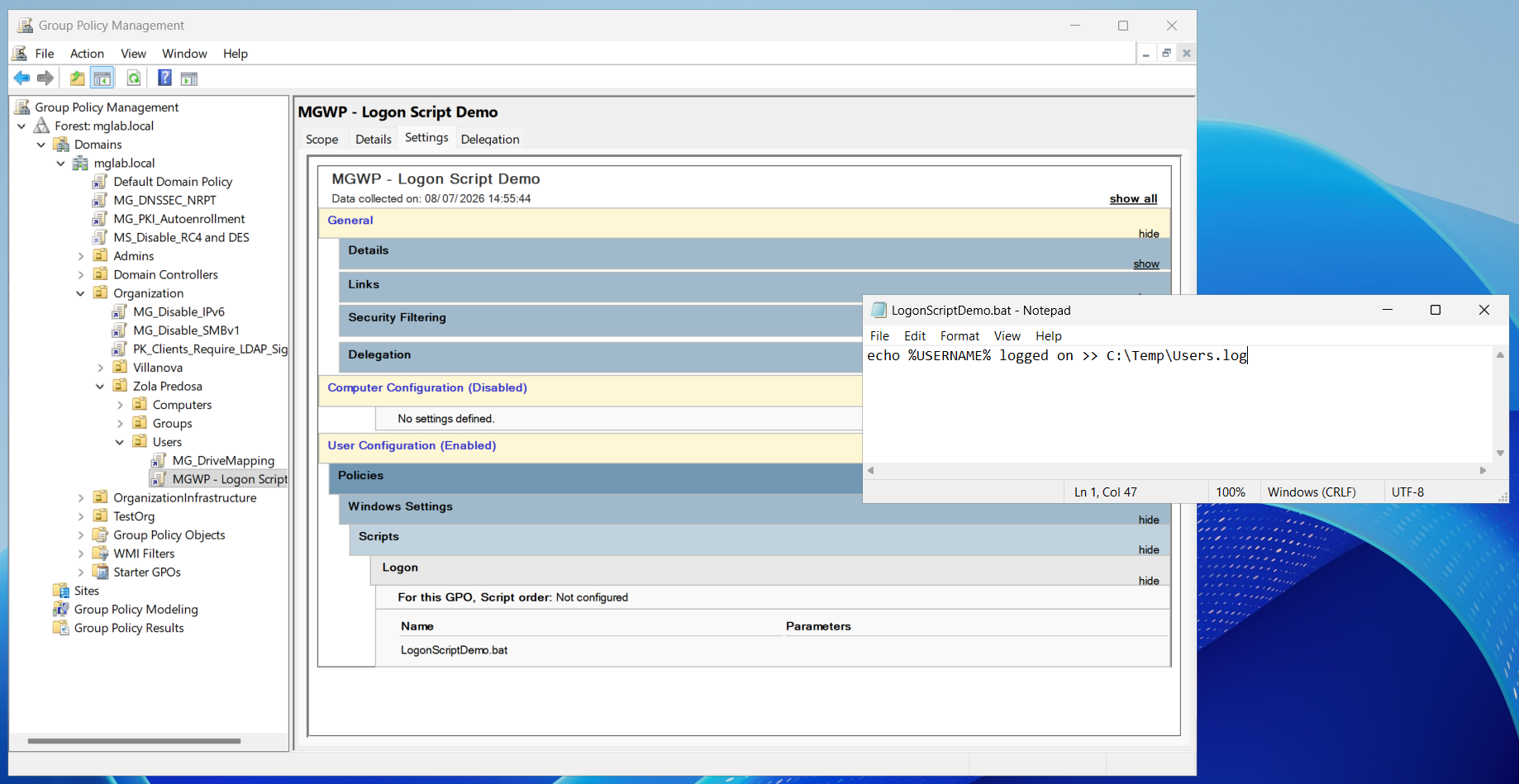
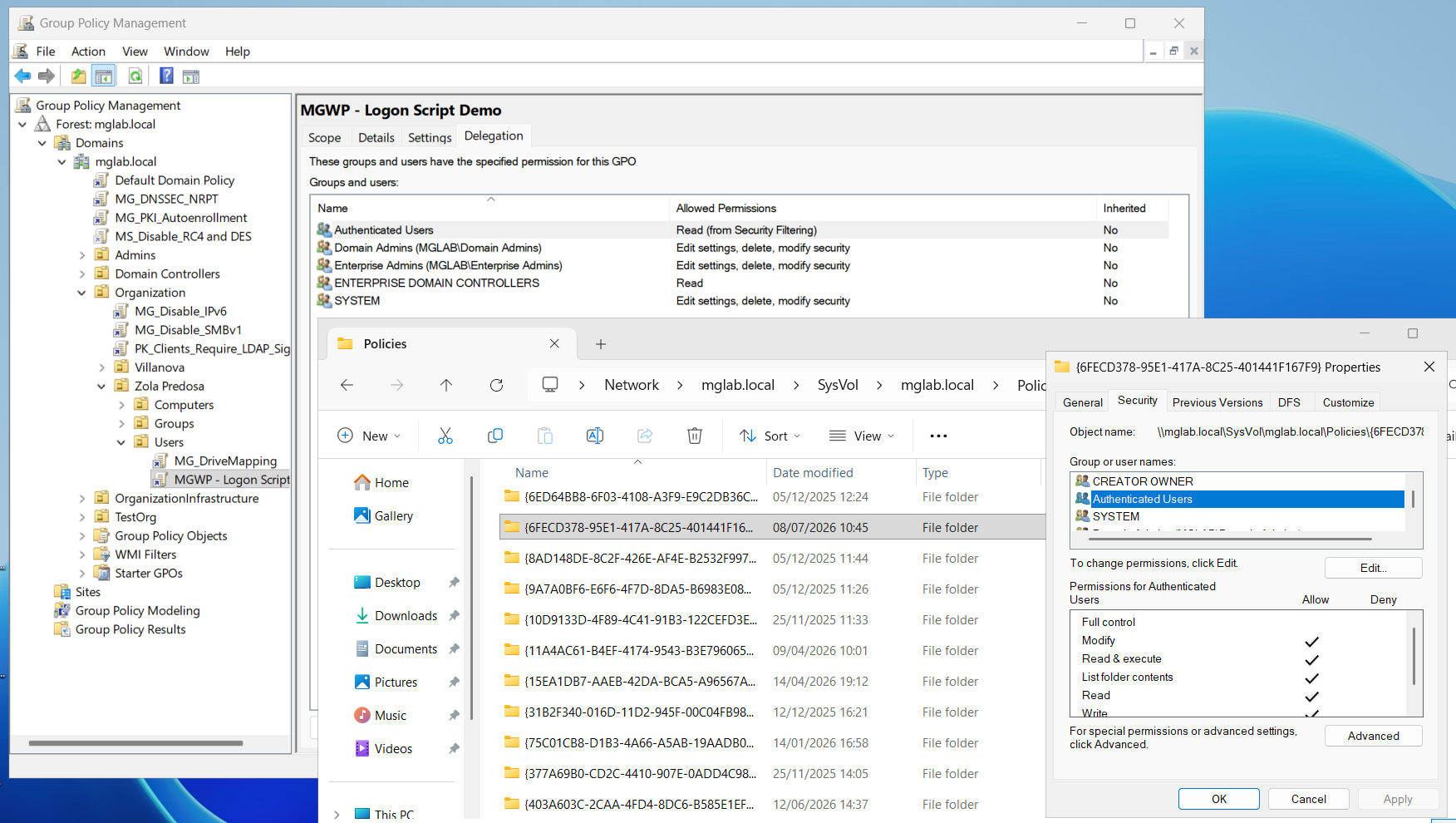
Scenario
Domain:
MGLAB.LOCAL
GPO:
MGWP - Logon Script Demo
Configuration:
User Configuration
 └ Windows Settings
    └ Scripts (Logon)
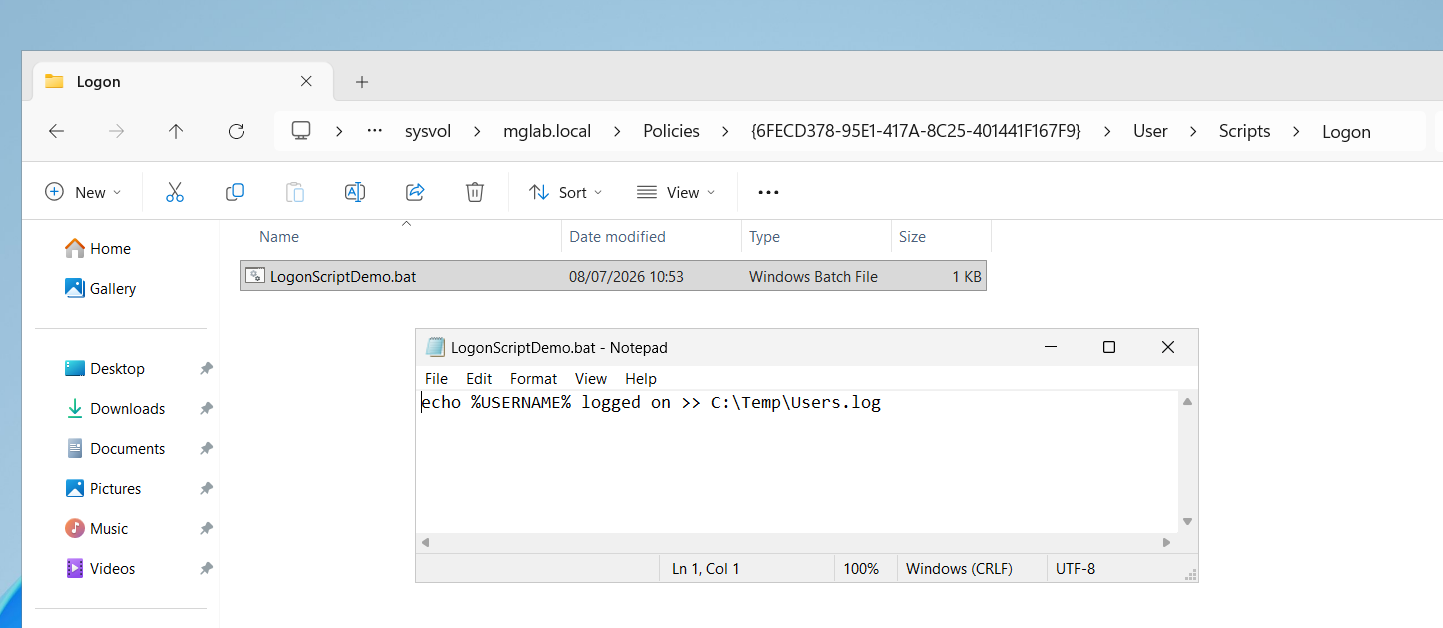
Initial script:
echo %USERNAME% logged on >> C:\Temp\Users.log
No offensive payload: demonstration behavior only.

Initial state
- correct ACLs;
- standard users with read-only access;
- administrators with full control.
Typical administrative mistake
During delegation or troubleshooting, permissions such as the following are assigned, for example:
Authenticated Users = Modify
or:
Everyone = Modify
or:
GPO-Operators = Modify
on a GPT folder in SYSVOL.
Practical effect
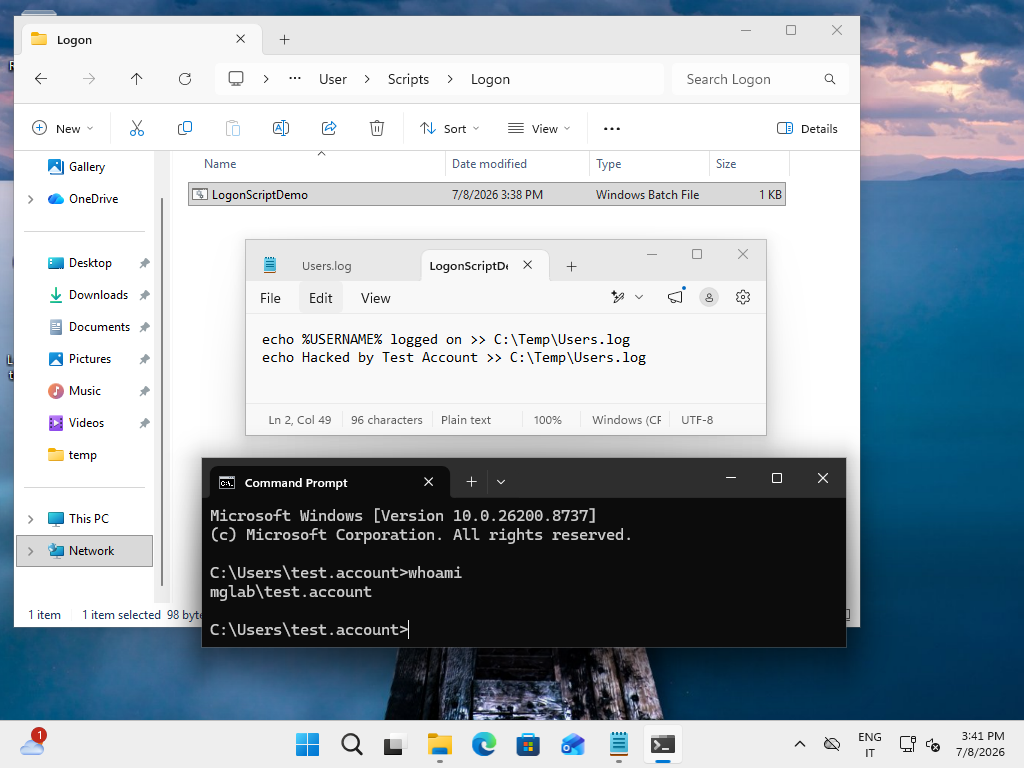
A standard user (for example, Test Account), with no GPMC rights and no administrative GPO delegation, can still modify the file distributed by GPT if they have Modify on that path.
From an AD/GPMC perspective, everything can look normal:
- no GPO delegation changed;
- no obvious permission changes in the console;
- policy apparently secure.
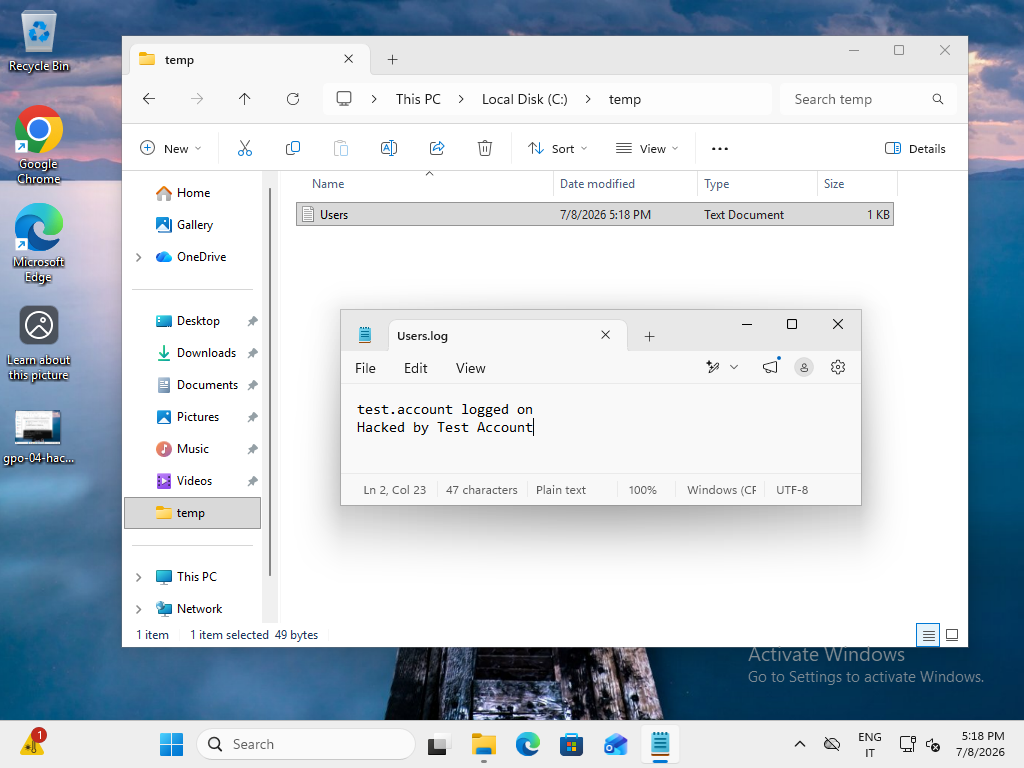
But on the next policy application cycle, clients consume the modified GPT content.
Pippo does not modify the GPO in the console.
Pippo modifies what the GPO distributes.
This difference is the core risk.
Why this is high risk in assessment frameworks as well
Many Active Directory security assessment methodologies classify as high risk any GPO-distributed content that is modifiable by standard users or groups that are not strictly authorized.
The principle is the same used by many AD posture analysis platforms: logical delegation governance is not enough, strong control is also required on the SYSVOL file system layer.
Quick verification checklist
1) GPO inventory
Get-GPO -All
2) GPO delegation review
Get-GPPermission -All -Name "MGWP - Logon Script Demo"
Note: in production, it is best to export all delegations and filter unexpected identities.
3) SYSVOL ACL analysis
icacls \\domain\SYSVOL\domain\Policies
or:
Get-Acl "\\domain\SYSVOL\domain\Policies\{GUID}" | Format-List
Look for critical indicators on GPT paths:
- Modify;
- Write;
- Full Control;
- unexpected inheritance;
- generic groups (Everyone, Authenticated Users) with permissions above Read/ReadAndExecute.
4) SHARE ACL analysis on SYSVOL and NETLOGON
Get-SmbShareAccess -Name SYSVOL
Get-SmbShareAccess -Name NETLOGON
Critical indicators on SHARE ACLs:
ChangeorFullgranted to broad groups;- SHARE delegation not aligned with least-privilege model;
- unexpected differences between SYSVOL and NETLOGON.
Operational remediation
Immediate priorities
- Remove unnecessary write permissions from GPT in SYSVOL.
- Verify Share ACLs as well, not only NTFS ACLs.
- Check inheritance on Policies folders and GUID subfolders.
- Revalidate delegated groups and effective membership.
Governance to stabilize
- Use dedicated groups for GPO delegation with clear naming and limited scope.
- Separate operational accounts from service accounts.
- Introduce periodic SYSVOL ACL reviews (for example, monthly or quarterly).
- Set expiration for every exception, with owner and rationale.
- Add a specific SYSVOL control to GPO change processes.
Recommended detection controls
- alerts on ACL changes in Policies{GUID} folders;
- monitoring of SYSVOL file changes not tied to approved change records;
- correlation with GPO modification events and maintenance windows.
Quick FAQ (search intent)
What is the difference between GPO Security Filtering and Delegation?
Security Filtering controls who applies the policy. Delegation controls who can administer the policy or its content. These are different planes: filtering can be correct while SYSVOL ACLs still expose GPT write paths.
What default permissions should you expect on SYSVOL?
In a healthy baseline, authenticated users are read-only and administrators keep full control. You should not see broad-group Change/Full on SHARE, or unjustified Modify on GPT NTFS paths.
GPC vs GPT: where is the operational risk concentrated?
GPC covers metadata and logical governance; GPT contains the payload clients execute. If GPT is writable by unauthorized identities, operational risk is immediate even if GPMC looks clean.
How do you restore SYSVOL permissions safely?
Start with ACL backup and a controlled change window. Remove unnecessary write rights on NTFS/SHARE, validate inheritance and delegated-group membership, then test GPO application on a pilot before broad rollout.
Is it enough to check only delegation in GPMC?
No. GPMC delegation covers the logical governance layer of the GPO, but by itself does not guarantee GPT content integrity in SYSVOL. You must always verify NTFS and Share ACLs as well.
Recurring mistakes to avoid
- Trusting only the delegation view in GPMC.
- Fixing incidents by temporarily opening Modify and never removing it.
- Reusing legacy groups without membership review.
- Delegating to overly broad groups to simplify urgent operations.
- Assessing only logical AD risk while ignoring file system risk.
Related deep dives
- RC4 deprecation in Active Directory
- Fallback Kerberos -> NTLM in Active Directory
- SPN in Active Directory: practical guide with KCD and RBCD
- Active Directory RC4 remediation: service accounts from RC4 to AES without password reset
Conclusions
When assessing Group Policy security, do not stop at this question:
Who can modify the GPO?
Always add the decisive question:
Who can modify what the GPO distributes?
If you do not protect SYSVOL with the same discipline used for GPMC delegation governance, an apparently solid policy can become an unreliable distribution vector for the entire domain.
Need help?
If you are running AD security assessments or GPO/SYSVOL hardening and want a quick but concrete review of ACLs, delegations, and real operational risk, we can analyze your scenario together and define a prioritized remediation plan.
- Contact me for a focused technical review of your environment.
- Support the project on PayPal if these contents help you in day-to-day work.
Appreciation
If this guide is useful, leave a like.